Resource Groups in Virtana Platform
Resource Groups in the Virtana Platform enable you to manage your infrastructure effectively. Think of them as a smart way to organize your infrastructure resources logically, no matter what environment they're in or what type they are.
These groups fit perfectly between your high-level applications and your individual resources. This means you can easily align your infrastructure organization, whether you're grouping by department, project, or workload, with exactly what your business and operations need. Additionally, Resource Groups make it simple to monitor, analyze, and optimize your infrastructure efficiently because they integrate with observability metrics, advanced filtering, and visualization tools, no matter how big or small your setup. These groups ensure that you can analyze and optimize your infrastructure groups efficiently by filtering and grouping alerts and topology.
You can use Resource Groups for a variety of operational and analytical tasks:
Logical Grouping Across Hybrid Infrastructure: Group VMs, hosts, and containers from different sources into a single logical group.
KPI Definition: Monitor and report KPIs at the group level, for example, cost, usage, and performance.
Hybrid Visibility: Abstract away physical differences between cloud and data center assets.
Simplified Views: Quickly slice and dice your infrastructure for better analysis and troubleshooting.
Topology Filtering: You can use Resource Groups as filters in topology views to understand dependencies and communication maps.
Alert and Dashboard Filtering: Filter alert timelines and dashboard metrics using Resource Groups to isolate and analyze the behavior of grouped entities.
Example use cases
You can use Resource Groups to dynamically collect all GPU-based workloads, such as VMs, containers, or nodes with GPU resources that are deployed in a specific region, regardless of whether they are on-premises or in the cloud, for cost analysis.
You can create a Resource Group that monitors all production services, such as deployments, VMs, or containers that are tagged as being owned by a specific team.
You can use Resource Groups to aggregate and compare resources from both on-premises and cloud clusters that are associated with the same project.
Open Resource Groups in Virtana Platform
Log in to the Virtana Platform, click Settings (
 ), and select Resource Groups.
The Resource Groups page opens.
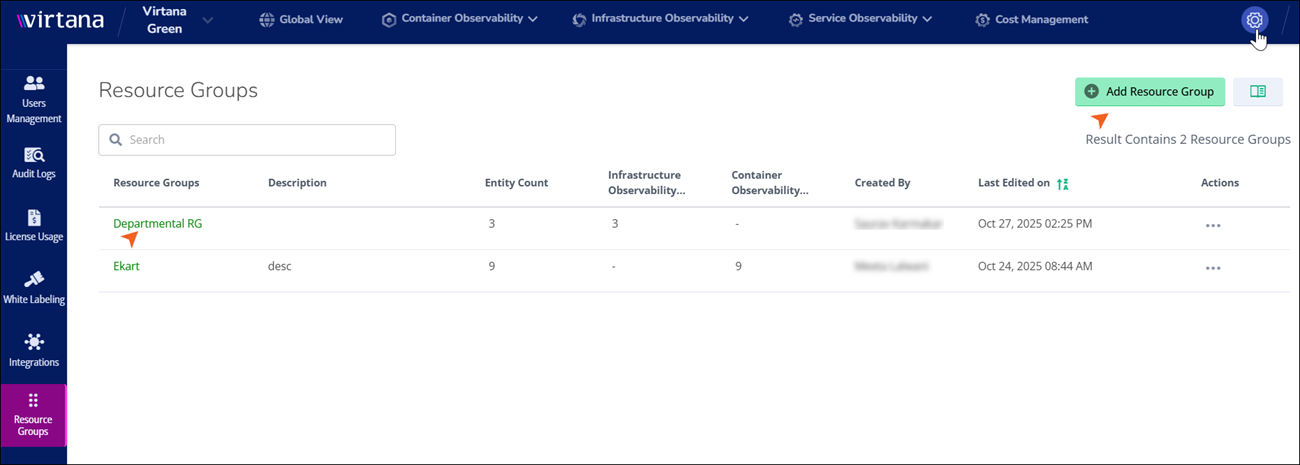
To create a new resource group, click Add Resource Group.
The Configure Resource Group window opens.
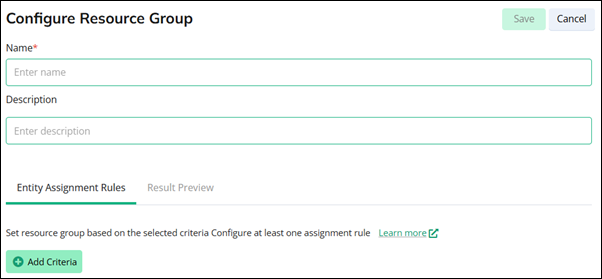
You can assign a unique, descriptive name to the resource group. Optionally provide context or notes about the group’s purpose, scope, or configuration in the Description field. Click Add Criteria to define the resource group criteria.
(Optional) To edit an existing resource group, click on the resource group name.
The Update Resource Group window opens.
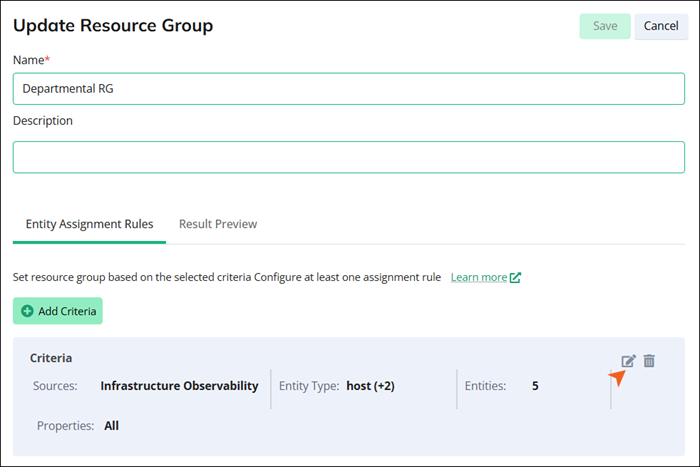
You can edit the resource group's name. Optionally provide context or notes about the group’s purpose, scope, or configuration in the Description field. Click Add Criteria to define the new criteria for your resource group, or click the edit (
 ) button to update the existing criteria.
To configure your Resource Groups, see Resource Groups Configuration.
In Resource Groups, you can view and edit your existing groups or create new ones. You can also remove groups. Resource groups are listed in alphabetical order by default, but you can filter the columns to search for specific groups. For example, you can filter by Infrastructure Observability or Container Observability to find all the resource groups for these modules.
Column | Description |
|---|---|
Resource Groups | Name assigned to the group when it was created. Each resource group name is unique. |
Description | Description provided when the group was created. |
Entity Count | Number of resources in the group. |
Infrastructure Observability | Number of infrastructure resources monitored. |
Container Observability | Number of containerized resources monitored. |
Created By | The user who created the group. |
Last Edited On | Timestamp of the most recent modification. |
Actions | Open the Actions menu to delete this resource group. |
Categorizing the Resource Group
You can categorize resource groups as high-level labels or tags that you assign to resources based on shared characteristics, such as environment, application type, business unit, region, or any other logical grouping relevant to your organization.
You can create Resource Groups based on:
Source type selection, such as manual inclusion.
Entity types, such as cluster, VMs, and storage.
Tags, labels, such as location, owner, project, and environment.
Resource groups act as dynamic filters in the Topology view and on the alerts page. This functionality allows you to isolate specific segments of your environment, which helps you with focused troubleshooting and enhanced governance. The groups automatically update to reflect changes in your underlying infrastructure.