Licensing
From the Settings page you can manage and import IO licenses, if you have administrator privileges.
Beginning with IO 6.2, licenses are purchased as a base license with add-on Wisdom Pack Licenses. Each Wisdom Pack incorporates an established set of IO components based on site requirements and infrastructure configuration. Licenses purchased prior to IO 6.2 must have been converted by Virtana before updating to 6.2 or later. Therefore, it is strongly recommended that you do not perform the update without the Wisdom Pack licenses ready.
Base Licenses
The Base License is the minimum license required for a IO installation. A Base License is required before installing Wisdom Pack Licenses in your environment.
A Base License can be a Subscription or Evaluation type. Enterprise (Appliance) Edition and Virtual Editions of IO can accept Subscription Base License types.
Only one Base License type can be installed on a system.
The following components are included as part of the standard IO Base License:
Core components of IO (Dashboard, Topology, Inventory, Alarms, Reports)
All IO Analytics
Splunk AppDynamics, Dynatrace, and ServiceNow Integrations
REST API SDK
Wisdom Pack Licenses
Each Wisdom Pack can be purchased as a Subscription License for the Enterprise Edition or Virtual Editions of IO. Evaluation Licenses are also available for Wisdom Packs, so you can assess the value of any Wisdom Pack for your environment.
In addition to the Base License components, each Wisdom Pack includes specific components, required for particular environments. Following are the available Wisdom Packs, which can be implemented individually or in combination, depending on your needs:
Wisdom Pack | Description | Supports1,2 | Comments |
Operating System | Each (1) license can be applied to any included OS. Each count of the license also includes 5 NetFlow endpoints. |
| Example: If you purchase 1,000 Operating System Wisdom Packs, then you also receive licenses for 5,000 NetFlow endpoints, even if you do not purchase any IP Network Wisdom Packs. |
Virtualization | Each (1) license can be applied to 1 included hypervisor or specialized OS. Each count of the license also includes 50 NetFlow endpoints. |
| Hyper-V, vSphere, and PowerVM are all licensed by host (specialized OS). |
Enterprise Storage | Each (1) license enables monitoring of 1 controller. Depending on the array type, the controller can be managing N number of engines or nodes (usually 2 or 4). The ratio in the Supports column is read as “1 license to N engines / nodes”. |
| Example: To monitor 1000 Isilon nodes and 500 SVC nodes, you need 500 counts of the Enterprise Storage Wisdom Pack, in which 250 would be consumed to monitor 1000 Isilon nodes (250 controllers) and 250 consumed to monitor 500 SVC nodes (250 controllers). |
Software-defined Storage | Each (1) license enables monitoring of 1 SDS node |
| |
SAN Switch | Each (1) license enables monitoring of 1 SAN switch port. |
| |
Wiredata | Each (1) license includes 4 Link Credits, where each count of each type of Link consumes a certain number of Link Credits. | Credits consumed per count of each link type:
| Hardware probes decrement the license count based on types of ports on the probes (current link speed). If the current speed on the link changes, the counts are automatically recalculated. Cisco STS decrements the count based on number of Cisco STS-enabled ports used. With 1 Wire Data Wisdom Pack, some examples of what you can monitor include: 16 x 4GFC Links, OR 8 x 10GE Links, OR 8 x 8GFC Links, OR 4 x 16GFC Links, OR 16 Cisco STS Links |
FC32 Wiredata | Each (1) license includes 4 Link Credits. | 1 credit consumed per link. | Hardware probes decrement the license count based on types of ports on the probes (current link speed). If the current speed on the link changes, the counts are automatically recalculated. One (1) FC32 Wiredata Wisdom Pack can monitor 4 x 32GFC Links Note: FC32 Wiredata Wisdom Pack licenses are currently not compatible with line speed rates other than 32G |
IP Networks | Each (1) license enables monitoring of 1 NetFlow endpoint. | NetFlow Integration (1 endpoint) |
1 - A single quantity of a Wisdom Pack that includes multiple integration types cannot be allocated to multiple IO servers. For example, if you have a Virtualization Wisdom Pack, you cannot allocate a Hyper-V integration on server A and allocate the NetFlow Integration on server B.
2 - Additional supported items can be added between releases. Check with Virtana for the latest support information.
3 - Each unique monitored IP address consumes 1 count of NetFlow license, whether it is the source or destination IP at the time it was first discovered. Multicast/broadcast IP addresses do not consume NetFlow licenses.
Licensing information for the following Integrations can be found in their respective User Guides:
InfiniBox
Kubernetes
KVM
Linux
NetApp
Nexus
PowerStore
Pure
Solaris
UCS
Unity
VSP
Windows
XtremIO
Evaluation Licenses
Wisdom Pack evaluation licenses are available for IO integrations. These licenses allow you to easily try out any integrations in your environment.
Wisdom Pack evaluation licenses are separate from, and do not affect, paid IO subscription licenses. However, each evaluation license does add a fixed number of integration licenses to the licenses already on the appliance.
Evaluation licenses expire at a fixed date after generation of the license (not installation date). Different evaluation licenses can have different expiration dates. When an evaluation license expires, all licenses it added to the license pool are removed. Once expired, the license cannot be added to any IO platform.
You can upload multiple Wisdom Pack evaluation licenses to an appliance, but each evaluation license can be installed only once on a particular IO instance.
The type and number of evaluation licenses can be viewed on the Licensing page, accessed from the Settings tab. The Licensing table also displays the date the license was applied, the expiration date (after license generation), and the number of days remaining before the license expires.
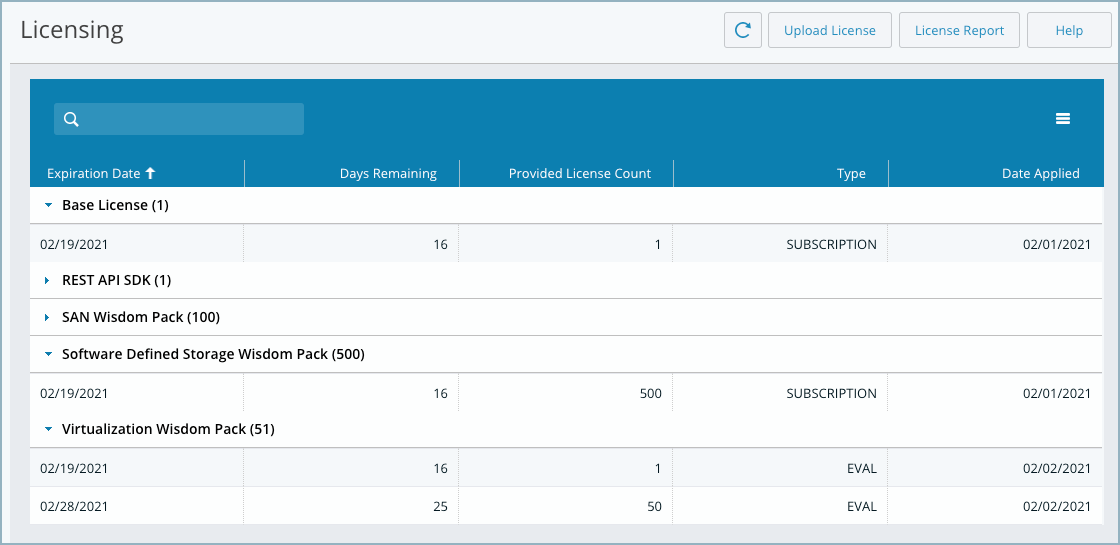
Evaluation licenses can be applied to IO 6.7.1 or later. The licenses will continue to work after IO upgrades.
Contact your account team or Virtana Support to request an evaluation license.
License Types
The Base License and Wisdom Pack Licenses are installed as a Subscription or Evaluation License types.
Subscription Base
Expires at end of paid subscription term
Full access (as long as the license is not expired)
Use with Subscription Wisdom Packs and Evaluation Wisdom Packs
Evaluation Base
Expires upon end of agreed evaluation period (typically 30 or 60 days)
Full access, with some limits
Use with Evaluation Wisdom Packs
A single IO Server can only accept one (1) type of Base License. The base license type determines which wisdom pack license types can be used.
Uploading a License
All license types are installed the same way.
You cannot use a Subscription License on an OVA with an Evaluation License. You must deploy a new OVA and upload a new license.
Prerequisites
You must have downloaded the proper license file to a system that is available to IO.
You must have administrator privileges on IO.
From the Settings tab, click Licensing.
The Licensing page displays information about the IO Base License and all of the WisdomPack licenses installed.
Licenses are contained in a single file that can be replaced with new values. Values can be replaced, but not added, to a license file.
Click Upload License.

Use the Browse button to select the license file and click Upload.
A dialog box displays, warning you that the upload deletes previous licensing information.
Click OK.
The new license file is uploaded and a message informs you that the license file was successfully loaded.
The new license displays on the Licensing page.
Tip
You can view license usage details by accessing License Reports.
License Notifications
Licensing notifications display in the IO UI, such as warnings that a license is about to expire. The content of the Licensing dialog box is different, depending on whether you are logged in as a IO administrator (with the IO-admin role assigned) or a user that is not assigned administrator privileges.
Non-administrators do not have access to configuration settings in IO and so cannot upload or modify licenses.
Note
If you restore a backup on an appliance with no license, no health notifications are generated to notify you that the license is not there. Always ensure the appliance is licensed after restoring from a backup.
Note
Oversubscription health notifications are not generated for software integrations after a Virtana Infrastructure Observability 6.1 restore. Restoring a IO 6.1 backup overwrites the licenses.
Expiring Licenses
You can view the expiration date of any WisdomPack License, Base License, or Evaluation License from the Licensing page on the Settings tab.
Within thirty days of a Base or Wisdom Pack license expiring, IO alerts the user in the following ways:
Displays a dialog in the UI with a warning that licenses are about to expire
Displays the expiring licenses in red font on the Licensing page
When a Base or Wisdom Pack license expires and results in oversubscription, IO alerts the user and Virtana in the following ways:
Displays a message in the UI with a warning that licenses have expired
Displays the expiring licenses in red font on the Licensing page
Sends an email alert to all IO administrators
Evaluation licenses expire based on the requested length of time assigned to the license, starting from the day the license is generated (not installed). When the license is about to expire, a notification is sent. When the license expires, all license counts associated with the Evaluation license are removed from the appliance.
From the Licensing page and from the Integrations page you can access a License Report that shows license usage information, based on license type, such as Enterprise Storage Wisdom Pack, FC32 Wiredata Wisdom Pack, etc. For each license type, the report displays the total number of licenses, as well as the number of used and remaining licenses.
Following is a sample License Report page.
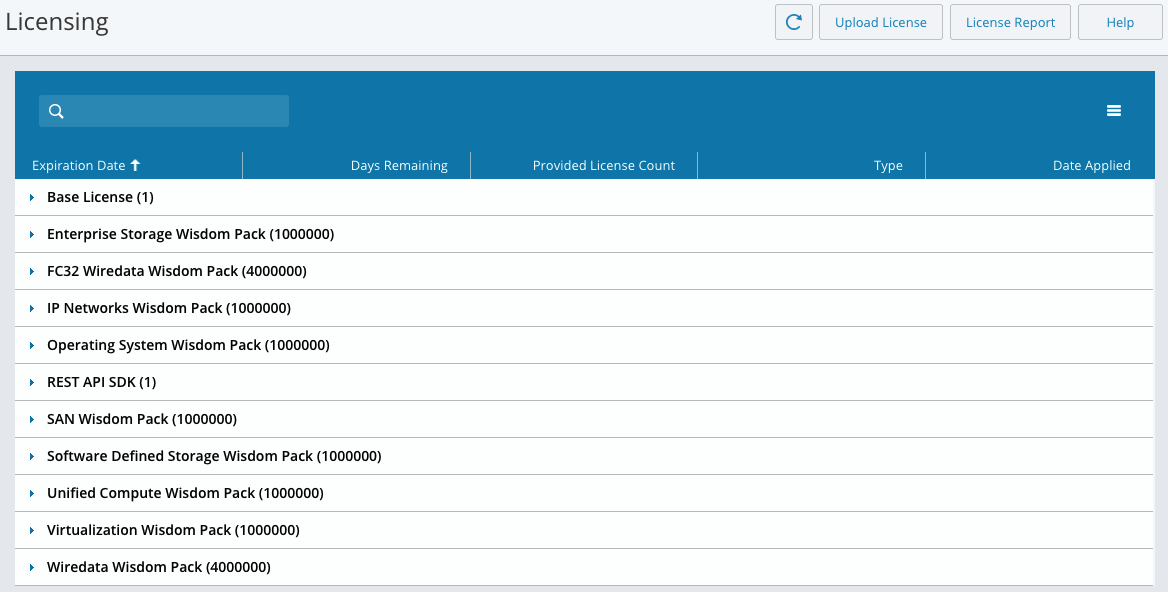
Auditing License Consumption Over Time
You can download a licensing audit log by clicking on the hamburger menu and then Download Audit Log, as shown in the following image.

After clicking on the button, a zipped Excel spreadsheet will be downloaded to your system. The spreadsheet contains two tabs. The first is a running log of Applied Licenses, which contains the following information:
Log Timestamp (ms) (milliseconds since Epoch)
Log Timestamp (UCT) (human readable)
UUID
Wisdom Pack
License Type
Expiration Date (UTC)
License Count
The second tab is a running log of Consumed Licenses. It contains the following information:
Log Timestamp (ms) (milliseconds since Epoch)
Log Timestamp (UTC) (human readable)
UUID
Wisdom Pack
Integration
Cost
Count
Used
The licensing audit logs are updated every 24 hours.