Understanding Polling and Metric Collection
The PowerMax Integration makes frequent REST API calls to determine when Unisphere for PowerMax has completed statistics data collection from the storage arrays. As soon as the Unisphere management tool finishes collection, IO captures the collected data to generate metrics for the PowerMax Integration.
The Dell EMC PowerMax statistics are generated at preconfigured 5-minute intervals. This PowerMax setting is not configurable.
However, you can set a polling interval in IO that is longer than 5 minutes. If the poll interval is longer than 5 minutes, then during metric collection the data from the previous poll interval is requested at 5-minute granularity. For example, if your poll interval is 1 hour, during collection IO requests the last hour's worth of data at 5-minute granularity. In this example, IO would publish 12 data points, 1 data point for every 5 minutes, after the poll interval completes. This approach allows for metric collection to be spread out over a longer period of time and to be done with fewer requests, thus reducing the impact on the Unisphere system being monitored.
Important
When IO logs the data from Unisphere for PowerMax, it uses the timestamp provided by Unisphere. If the clock on Unisphere is not accurate, then the data might be logged against an inaccurate time, or the data might be dropped altogether.
Enable metrics in Unisphere for PowerMax
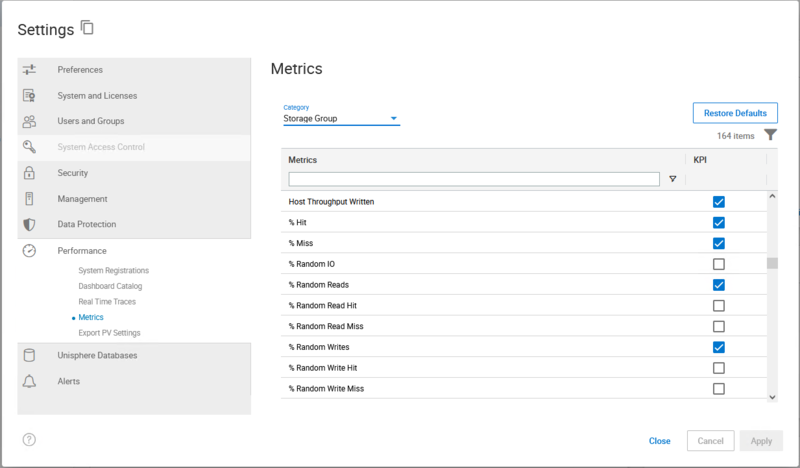
Some PowerMax metrics are not enabled by default in Unisphere. Use the following procedure to enable the metrics you want the PowerMax Integration to collect.
Note
This procedure describes the process for Unisphere for PowerMax version 10.3. Menu names and locations might differ in other versions.
In Unisphere, click the Settings icon (gear icon) in the top left corner.
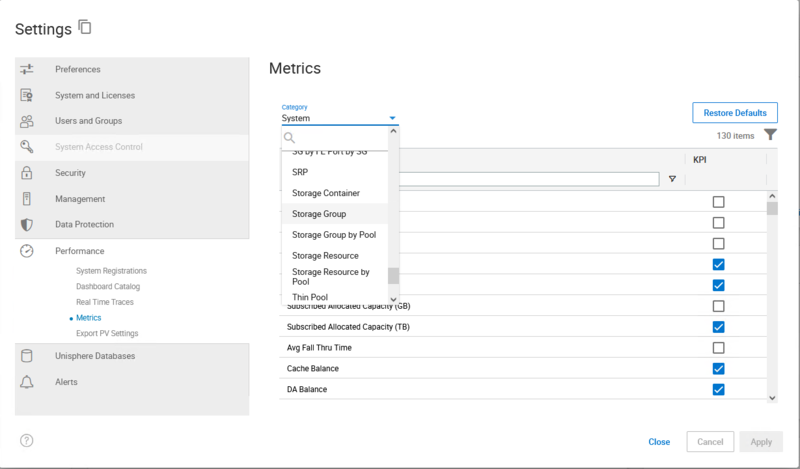
Click the Performance submenu.
Select Metrics.
Select the category for the metrics you want to enable. For example, Storage Group.
Select the checkbox next to each metric you want to enable.
Click Apply.
The selected metrics are enabled and become available for collection by the PowerMax Integration.