On-Premises Cost Governance - Cost Calculation Policies
The Cost Calculation Policy page in the Virtana platform provides an overview of defined policies related to cost governance. These policies define the rules and parameters for mapping usage metrics to meter cards and applying aggregation rules for resources such as compute, storage, and GPU. The platform mandates the presence of at least one cost calculation policy, which can be created manually or, if absent, is automatically generated by a scheduled cron job. This dual mechanism guarantees that cost calculations are never disrupted, even in newly deployed environments or after all existing policies are deleted.
Cost calculation policies are highly customizable, allowing organizations to tailor cost computations to their specific needs by incorporating parameters such as region, vendor, and resource type. The default policy, automatically created when needed, provides a broad and reliable baseline, ensuring continuity in cost management until custom policies are defined.
The following is a detailed breakdown of the cost calculation policy process:
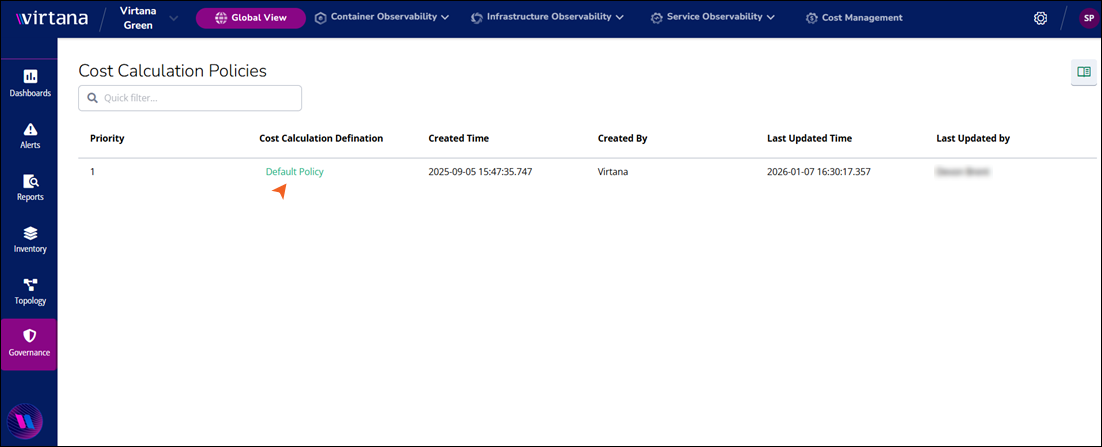
Priority: The order in which policies are evaluated. A lower number indicates a higher priority.
Cost Calculation Definition: Describes the policy applied for cost calculation. It helps Administrators identify the purpose of the policy.
Created Time: Indicates the exact date and time when the policy was initially created. The created time provides a timestamp for when the policy was introduced into the system. Accurate timestamps are critical for tracking policy changes and ensuring compliance.
Created By: Specifies the user or system account that created the policy.
Last Updated Time: Displays the most recent time the policy was updated. Keeping track of the latest updates is essential to ensure that the most recent version of the policy is in effect.
Last Updated by: Indicates the user who last modified the policy.
Editing a cost calculation policy
Editing a cost calculation policy allows you to refine how Virtana Platform computes on-premises costs by adjusting the policy’s core parameters, such as utilization calculation frequency, the customization of specific data points used within each interval, and whether cost is based on total or allocated capacity.
To edit the existing cost calculation policy, perform the following steps:
Log in to the Virtana Platform, select Global View in the header.
In the left navigation pane, click Governance and click the On-premises Cost Governance dropdown.
Select Cost Calculation Policies.
In the Cost Calculation Policies table, click the policy name.
The Cost Calculation Policies configuration window opens.
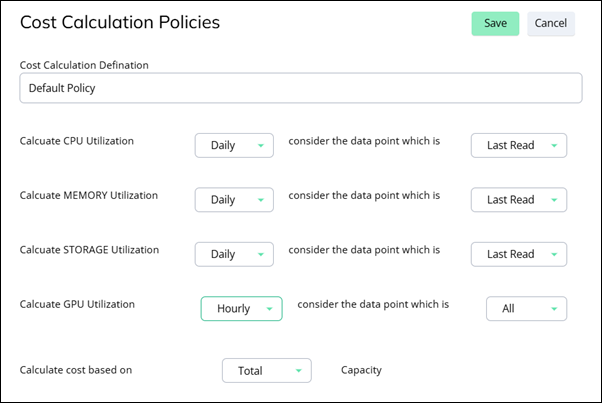
The Cost Calculation Policies configuration window contains the following fields:
Cost Calculation Definition: You can edit the default name of the policy.
Calculate CPU Utilization: You can customize the frequency at which CPU utilization data is evaluated for cost, such as Hourly, Daily or Monthly and also customize specific data points used within each interval, such as maximum, minimum, Average, last read, or all.
Calculate MEMORY Utilization: You can customize the frequency at which memory utilization data is evaluated for cost, such as Hourly, Daily or Monthly and also customize specific data points used within each interval, such as maximum, minimum, Average, last read, or all.
Calculate STORAGE Utilization: You can customize the frequency at which storage utilization data is evaluated for cost, such as Hourly, Daily or Monthly and also customize specific data points used within each interval, such as maximum, minimum, Average, last read, or all.
Calculate GPU Utilization: You can customize the frequency at which GPU utilization data is evaluated for cost, such as Hourly, Daily or Monthly and also customize specific data points used within each interval, such as maximum, minimum, Average, last read, or all.
Calculate cost based on: Cost calculation will happen for both the total and used capacity of the resource. You can select the cost calculation based on the total and used capacity. The dashboard will show the cost data based on this selection.
Note
View the customized cost in the On-Premises Compute Cost and Capacity under Global View Dashboards. See On-Premises Compute Capacity Summary.
Edit the policy according to your preference and click Save.