Deploy the OpenTelemetry Trace Collector
OpenTelemetry is an open source observability framework for cloud native software. It provides a single set of APIs, libraries, agents, and collector services to capture distributed traces and metrics from your application. The OpenTelemetry Collector receives traces, metrics, and logs, processes the telemetry, and exports it to a wide variety of observability backends using its components. For more information, see OpenTelementry Collector.
The OpenTelemetry (OTel) trace collector is a downstream component that receives application traces from your Kubernetes workloads and forwards them to the Virtana Platform trace pipeline. It works alongside the existing otel-metric-collector. Both collectors are deployed as part of the CO South Helm chart.
You can deploy the Otel trace collector if you want distributed tracing for applications running in Kubernetes clusters monitored by Virtana Platform. You can also view the traces correlated with metrics and topology in Global View for cross-cluster analysis and troubleshooting.
Prerequisites of the Otel trace collector deployment
You must have access to the cluster bastion host or jumpbox.
You must have Virtana Platform access to download the South deployment bundle. To perform this task, see Deploy Virtana CO South on GKE Autopilot clusters.
Otel trace collector deployment steps
Deployment of otel-trace-collector follows the standard CO South Helm deployment model used for other observability components.
In Virtana Platform CO home page, click System status, and select South Deployment.
Download the South deployment configuration bundle to your local environment..
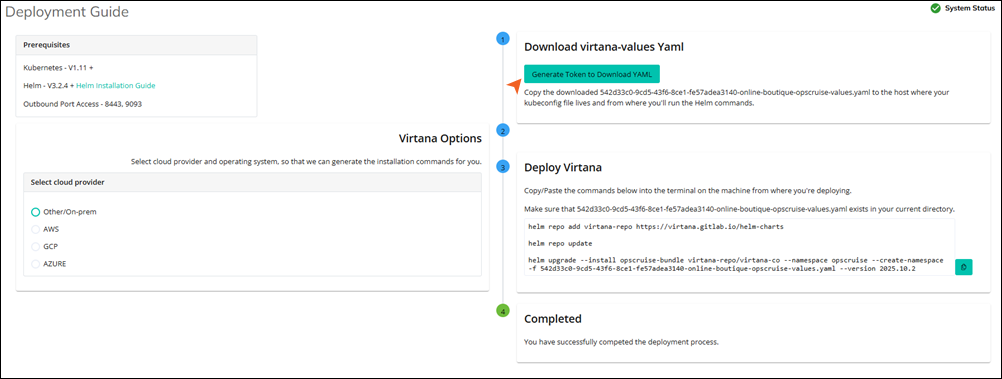
Edit the South override values YAML to enable the otel trace collector in the global section.
global:
  otel-trace-collector:
    enabled: true
This flag controls whether the otel trace collector component is deployed for this tenant as part of the south bundle.
Run the
helm upgradecommand using the provided chart version and your modified values file in the Virtana Platform.helm upgrade <release-name> <chart-name> \ --namespace <target-namespace> \ --version <release-version> \ -f <tenant-south-values>.yaml
<tenant-south-values>.yaml: Your customized South override YAML.<target-namespace>: The target namespace is opscruise.<release-version>: South Helm package version corresponding to your Virtana Platform release.
Validate that the otel trace collector pod and service are running in the target namespace.
Default service endpoints
Once the otel trace collector is deployed in the target namespace, you can view the following endpoints that are available inside the cluster:
Component | Endpoint | Description |
|---|---|---|
Collector Service |
| Applications should export OTLP/gRPC traces here. |
Trace Router |
| The collector automatically forwards spans to this internal router. |
Optional configuration overrides
All of the following overrides live under the otel trace collector key in the south override values YAML. You can further customize the behavior of otel trace collector in the override values file.
Override the trace-router endpoint
You can use this endpoint to override the default trace-router endpoint.
otel-trace-collector:
  config:
    exporters:
      otlp:
        endpoint: trace-router-service.opscruise.svc.cluster.local:4317
Use this when:
The trace-router endpoint differs from the default FQDN.
You need to route to a different trace back end in advanced or special deployments.
Configure cloud provider
The default cloud provider is onprem. You can also select the supported values, such as aws, gcp, azure, and onprem.
otel-trace-collector:
  cloudProvider: "onprem"
This is used for tagging and environment-specific handling inside the collector or Virtana Platform.
Add additional headers to spans
You can add custom headers, such as X-Scope-OrgID, to all exported spans.
otel-trace-collector:
  config:
    exporters:
      otlp:
        endpoint: trace-router-service.opscruise.svc.cluster.local:4317
        headers:
          X-Scope-OrgID: "co-x-scope-ID"
Use this when:
The trace back end expects per-tenant/org routing headers.
You need to logically separate spans by tenant or organization.
Add cluster tag to spans
You can tag spans with a cluster name.
otel-trace-collector:
  cluster:
    name: "co-cluster"
This enables cluster-level filtering and aggregation of trace data.