ITL Examples
Divide a host to specify one ITL (initiator:target:lun) combination responsible for the application and another ITL combination responsible for the backup operations.
For a backup operation, select only the target port and LUNs to which all back-ups are sent. IO discovers which ports and LUNs are communicating with each other and build the entity for you.
You want a quick way to configure an application entity but do not know its downstream resources. You can create an application entity by specifying only the initiator port WWN.
If you create a combination with a * notation but do not have a performance probe monitoring the traffic, no metric information is be stored. This example could occur when an administrator wants to provision application entities before the performance probe is deployed.
FC Conversations
Note
The hardware SAN Performance Probe (ProbeFC) must be installed in your environment to discover and collect data for FC Conversation entities.
Contact Virtana Sales for more information.
Fibre Channel conversations are communications between Initiators, Targets, and LUNs (ITLs):
Initiator (HBA Port)
Target (Storage Port)
LUN (Logical Unit Number)
As conversations occur and are discovered by ProbeFC, the metrics are captured and stored, and the FC Conversation entities are named with an initiator:target:lun convention. These entities can be modified like any other discovered entity, with a Name and Description. The FC Conversation entity type is available in the following areas of IO:
Entity list
Entity editing (name, description)
Alarms (Exchange Performance only)
Reports (all types)
Analytics (Trend Matcher, Event Advisor)
When you discover FC Conversations, you must apply filter criteria. Otherwise, depending on the size of your network, an unmanageably large number might be displayed. Narrow the choices by filtering:
Application
Initiator - Host, HBA Card, HBA Port
Target - Storage Array, Storage Controller, Storage I/O Module, Storage Port
An initiator (typically a host) negotiates with a target (typically a storage device) to connect to a LUN (a disk partition, or one or more disk drives).
FC Conversations cannot be searched by name from the FC Conversation page. After filtering, you can sort by the Name column and manually scan the results.
Representation | Description |
|---|---|
ITL | Initiator-side port, target storage port, and LUN |
IT* | Initiator-side port, target storage port, and any LUN |
I** | Initiator-side entity, wildcard for target, LUN(s) (replaced by Devices) |
*TL | Target storage port (WWN) and LUN |
If you specify a wildcard (*), the performance probe fills in the entity information based on the conversations it observes. Applications configured this way must have a performance probe monitoring the traffic.
You can configure an application entity by choosing a port entity, such as a target port or host port. When a port type is the starting point in the entity creation process, you have the option to select the exact target port and LUN. You could also allow the system to discover the conversations by selecting I**.
When you configure an application entity by choosing a configured entity type such as a host or storage processor, IO uses only discovered conversations. For example, if you start configuring an application entity with a host entity (consisting of ports), IO doesn't allow you to then specify the target entity. The configuration wizard uses only the * notation.
A target port can be discovered if a ProbeFC monitors the traffic or zoning is configured.
Discovering FC Conversation Entities
As conversations occur and are discovered by ProbeFCs, the metrics are captured and stored, and the FC Conversation entities are named with an initiator:target:lun convention. As with any other discovered entity, these entities can be customized with a Name and Description.
Click Inventory and select FC Conversation from the Conversations group.
The FC Conversation Filter displays.
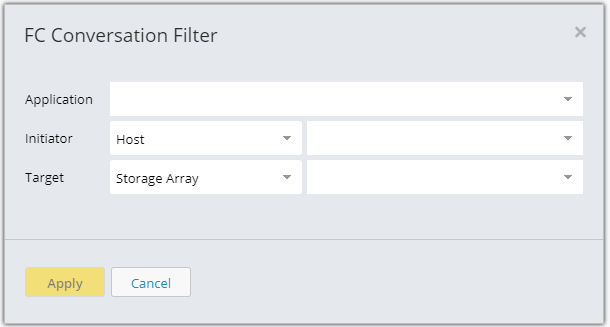
Specify one or more filter criteria, and click the Apply button.
At least one entity type must be specified to filter FC Conversations; if you specify multiple entity types, an AND filter is created. A search box is available for each type. The filtered FC Conversation list is displayed, in which the grayed-out discovered Name column is the combination of the Initiator, Target, and LUN columns. These columns can be sorted in ascending (default) or descending order.
Select an FC Conversation by clicking the row.
The row is highlighted. You can display the properties of a conversation with the Show Properties menu item. Properties of the Initiator, Target, and LUN are displayed.
Click the Edit menu item.
The FC Conversation page is displayed, showing the original discovered name of the conversation. Properties are also displayed, in a read-only area.
Specify the information you choose in the Name and/or Description, fields, and click the Save button.
The revised information in the newly-created conversation entity is now shown in the FC Conversation list, and the Name field is no longer grayed out.
The revised detail information of the newly-created conversation entity is now shown on the edit page.
NFS/SMB Conversation
NFS/SMB conversations are communications between:
Source
Destination
Filesystem
As conversations occur and are discovered by ProbeNAS, the metrics are captured and stored, and the NFS Conversation and SMB Conversation entities are named with an source:destination:filesystem convention. These entities can be modified like any other discovered entity, with a Name, and/or Description.
When you discover NFS or SMB conversations, all of them are displayed, and no filter criteria are applied.
The following child entities are supported for the NASProbe, by manual creation, entity management, or entity import:
Applications - NFS Conversation, SMB Conversation
Hosts - Source IP Address
Storage Arrays - Destination Ethernet Ports
Storage Controllers - Destination Ethernet Ports
I/O Modules - Destination Ethernet Ports
Alarms based on NAS metrics:
Performance
Histogram Performance
Average Performance
Procedure Rate
Procedure Limit
Errors
Link Errors
Packet Errors
Flow Control
Discovering NFS or SMB Conversation Entities
As conversations occur and are discovered by ProbeNAS, the metrics are captured and stored, and the NFS Conversation entities are named with an source:destination:filesystem convention. As with any other discovered entity, these entities can be customized with a Name and/or Description.
Click Inventory and select NFS or SMB Conversation from the Conversations group.
Select the NFS/SMB Conversation entity type.
The list of conversations is displayed.
Select an NFS or SMB conversation by clicking the row.
The row is highlighted.
You can display the properties of a conversation with the Show Properties menu item from the dropdown.
Specify the information you choose in the Name and/or Description fields, and click Save.
The revised information is now shown in the NFS Conversation or SMB Conversation list.