Deploy Virtana CO South on GKE Autopilot clusters
Virtana is recognized as a Google Autopilot partner, so you can deploy Virtana Container Observability on Google Kubernetes Engine (GKE) Autopilot clusters. Use the following steps to deploy Virtana’s Container Observability (CO) on GKE Autopilot clusters, so you can gain comprehensive visibility into your dynamic, containerized workloads running on GKE Autopilot.
Prerequisites
You need the following requirements to complete this procedure:
GKE Autopilot: v.1.32.2-gke.1652000 or later
Kubernetes: v1.11 or later
Helm: v.3.2.4 or later
Perform the following steps to deploy Container Observability on GKE Autopilot clusters:
Log in to the Virtana Platform.
Click Container Observability and select the required cluster.
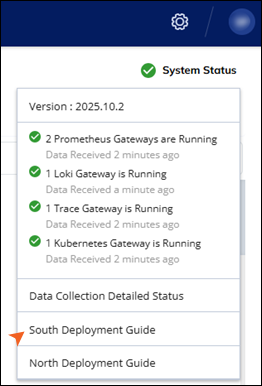
In the top right corner, click System Status and select South Deployment Guide in the dropdown menu.
The Deployment Guide page opens.
Click Generate Token to Download YAML to generate a URL to download the South
values.yamlfile.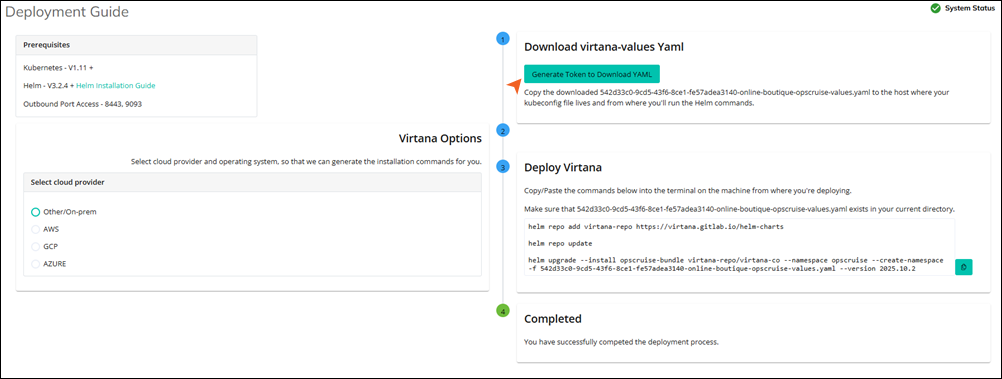
Copy the generated URL and run it locally on your machine so you can download the YAML file.
You can run the commands provided by your Container Observability deployment or enter the following commands:
helm repo add virtana-repo https://virtana.gitlab.io/helm-charts
helm repo update
helm search repo virtana-repo/virtana-co
Open the
<ORG_ID>-<CLUSTER_NAME>-virtana-co-values.yamlfile in your editor of choice. In theglobalsection of the file, set thegkeAutoPilotvariable totrue.Save your changes and continue on the Deployment Guide page.
Run the following Helm command to deploy the workloads:
helm upgrade --install virtana-bundle virtana-repo/virtana-co --namespace virtana \
  --create-namespace -f <ORG_ID>-<CLUSTER_NAME>-virtana-co-values.yaml \
  --version <LATEST_VERSION>
Deploy Google Cloud Gateway for Infra Level Observability
You may need to generate Google Cloud Gateway credentials to deploy the gateway for infrastructure-level observability. This is an optional procedure for generating the credentials and deploying the gateway.
This task assumes that you are on the South Deployment Guide of Container Observability.
On the Deployment Guide page, navigate to Select cloud provider in the Virtana Options section and select GCP.
You can view the instructions to create a GCP service account and assign the Viewer Role.
Run the following command to deploy the Google Cloud gateway with the GCP credentials:
helm upgrade --install virtana-bundle virtana-repo/virtana-co --namespace virtana \
--create-namespace -f <ORG_ID>-<CLUSTER_NAME>-virtana-co-values.yaml \
--version <LATEST_VERSION> --set gcpgw.enabled=true --set-file \
gcpgw.gcpCreds=virtana-gcpcreds.json