User preferences
You can set your own preferences for several features.
To view or change your preferences:
Click your user account name (in the upper-right corner of any Virtana Service Observability page) and then click Settings.
In the left column, click User Preferences.
Options
- Theme
Your system administrator can configure a default theme for all users, either dark mode (light text on dark background) or light mode (dark text on light background). You can override the configuration if desired.
- Table layout
Tables present data in many places. You can shrink the amount of space between all table entries and display more entries per page by choosing Compact View.
- Homepage
Your system administrator can configure a homepage for all users. You can choose any personal or shared dashboard instead, if desired.
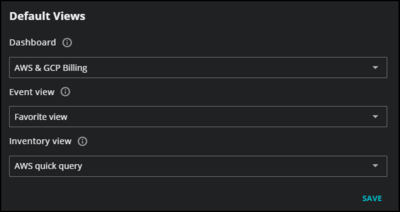
- Default Views
Your system administrator can select a default dashboard, event view, or inventory view for all users. You can choose any personal or shared dashboard, event view, or inventory view instead. When you navigate to Dashboards, Events, and Inventory, the selected view will open.
- MCP Server Endpoint
Connect an MCP-compatible AI client (such as Goose, Claude, Cursor, or VS Code Copilot) to Virtana Service Observability and interact with observability data using natural-language requests. To configure the connection, use your SO API Address with
/mcpappended as the MCP server URL and an API key. For setup instructions and supported requests, see SO MCP server.