 Top Event Producers tile
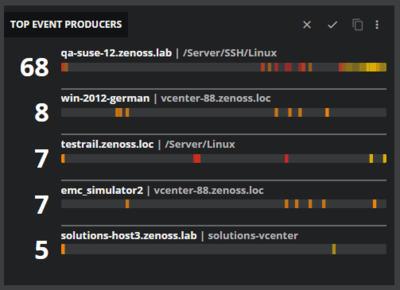
The Top Event Producers tile displays the entities that have the greatest number of event instances reported against them during the current time period, in descending order. The tile displays entity names, the total count of event instances, and a heat map.
Each entity name in a tile is a link to the entity’s Smart View page.
The total count is the deduplicated count.
The heat map represents the distribution of event occurrences during the current time period.
Example tile
Tile configuration options
- Tile title
The text that appears in the upper-left corner of a tile.
- Filters
One or more comparisons that select events to include in a tile. Events that do not match all comparisons are excluded.
You can specify the following fields in comparisons. If you specify the same field multiple times, the field values are combined.
Field
Description
Status
One or more event statuses (Open, Suppressed, or Closed).
Severity
One or more event severity levels (Critical, Error, Warning, or Info).
Summary
Text included in an event summary.
Parent entity name
The name of an entity's parent entity.
Name
The name of an event.
Last seen
Date and time the event was last seen.
Entity name
The name of an entity associated with an event.
Event class
The name of a class associated with a event.
Source
The instance identifier of a source type, for example, cz0.
CZ production state
A Collection Zone production state name.
CZ location
The name of the Collection Zone Locations organizer.
CZ groups
The name of the Collection Zone Groups organizer.
CZ systems
The name of the Collection Zone Systems organizer.
CZ priority
The Collection Zone device priority associated with an event.
CZ device class
The Collection Zone device class associated with an event.
CZ incident
Include or exclude events opened as incidents.
- Count
The maximum number of entities to include in a tile.
If the number of entities displayed is less, the list expands.
- Types
(Optional) The types of entities to include in a tile.
You can include multiple types.
- Label format
The content to include in hover text.
You can enter your own label format.
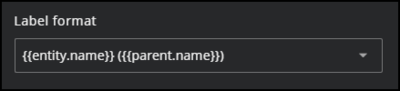
Entering two open braces (
{{) allows auto-completion.
Tile scope filters
(Optional) Create a specific filter just for the tile. This is useful if you need to compare different services side-by-side.
Use the query builder to create and apply a filter to the tile:
Click the + (plus sign) to add a clause.
Click in the first field to select an entity field.
Select your operator, then your value.
Use buttons to add/remove clauses. Click X to remove all.