Microsoft 365 application connector
Virtana Service Observability provides a ready-made connector for your Microsoft Teams, Microsoft OneDrive, Microsoft Exchange, and Microsoft SharePoint cloud applications. After you set up the Microsoft 365 application connector, you can monitor metrics for your Microsoft applications.
Before you begin
Virtana Service Observability uses the Microsoft Graph API to gain access to your Microsoft 365 applications. To enable access, first register a Microsoft 365 application in the Microsoft identity platform. To add a new Microsoft 365 credential in Virtana Service Observability, see Add Microsoft 365 credentials.
For the Microsoft application connector to access data in Microsoft Graph, you must grant it the permissions it needs. For a list of the Microsoft Graph permissions required for the connector, see Required Microsoft Graph permissions.
Set up a Microsoft 365 application connector
Note
Your account must be assigned the Manager role to create and manage connectors.
Log in to Virtana Service Observability as a user with the Manager role, and then open the ADMIN > Connectors page. Click ADD CONNECTOR.
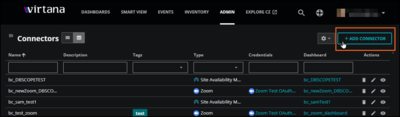
On the SELECT CONNECTOR TYPE dialog box, click the card of the Microsoft application you want to connect to. The ADD CONNECTOR dialog box opens.
When you select a specific Microsoft application, the ADD CONNECTOR dialog box is customized for that application. In the following example, Microsoft OneDrive is the selected application.
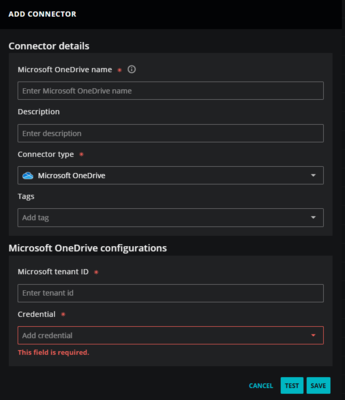
In the Microsoft <application> details section, add the following information about your application:
In the Microsoft <application> Name field, enter a unique name for your application connector.
The name you choose is used as the source name for the data that Virtana Service Observability collects.
(Optional) In the Description field, enter text to associate with your Microsoft 365 instance.
Keep the Connector type as the Microsoft application you are connecting to.
(Optional) In the Tags field, enter one or more terms to associate with your Microsoft 365 instance.
In the Microsoft <application> configurations section, add the connection information.
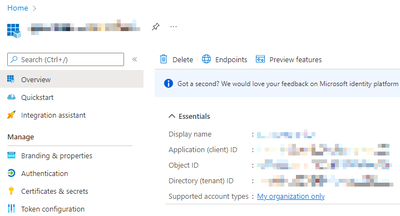
In the Microsoft Tenant ID field, enter the tenant ID as displayed in the Essentials section on the home page of your Microsoft 365 app registration.
In the Credential list, select an existing credential or create a new one.
When you choose Create new credential, the dialog box expands to include fields for creating a new credential for Microsoft 365.
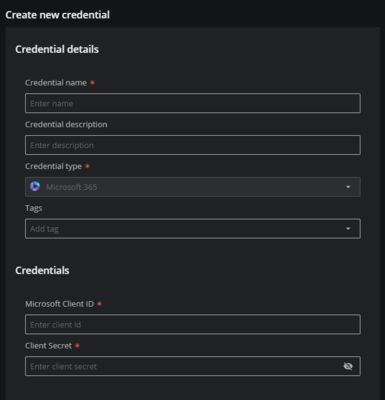
For more information about creating a new credential, see Add Microsoft 365 credentials.
(Optional) Click TEST to test your configuration before saving. A success or error message appears.
Click SAVE.
To view the metrics Virtana Service Observability collects, copy a template or create a new dashboard.
Microsoft 365 application metric data
View the metrics for Microsoft 365 connectors in the following tables. Microsoft 365 connector metrics include metrics for the Teams, Exchange Online, OneDrive, and SharePoint applications.
Microsoft Teams
Microsoft Teams connector metrics include metrics for tenants, groups, and users.
Tenant metrics
Microsoft Teams tenant metrics include the following:
Metric | Units | Description |
|---|---|---|
| Users | Total number of active users |
| Status code | Graph API response status code |
| Milliseconds | Graph API latency response time |
| Users | Total number of active Exchange users |
| Users | Total number of inactive Exchange users |
| Bytes | Total storage size of groups mailbox |
| Bytes | Total storage size of groups sites |
| Users | Total number of active Office365 users |
| Users | Total number of inactive Office365 users |
| Bytes | Total space consumed by files in the OneDrive recycle bin |
| Files | Total number of OneDrive files |
| Bytes | Total space remaining before reaching the OneDrive quota limit |
| Users | Total number of active OneDrive users |
| Users | Total number of inactive OneDrive users |
| Users | Total number of active SharePoint users |
| Users | Total number of inactive SharePoint users |
| Users | Total number of active Skype Business users |
| Users | Total number of inactive Skype Business users |
| Users | Total number of active Teams users |
| Users | Total number of inactive Teams users |
| Integer | Total channel files and folders |
| Messages | Total channel messages |
| Channel tabs | Total channel tabs |
| Users | Total channel users |
| Groups | Total number of groups |
| Users | Total number of users |
Group metrics
Microsoft Teams group metrics include the following:
Metric | Units | Description |
|---|---|---|
| Messages | Total number of private chat messages |
| Calls | Total number of calls made in Teams |
| Messages | Total number of chat messages in Teams |
| Devices | Total number of Android devices usage in Teams |
| Devices | Total number of iOS devices usage in Teams |
| Devices | Total number of Mac devices usage in Teams |
| Devices | Total number of web device usages in Teams |
| Devices | Total number of Windows devices usage in Teams |
| Devices | Total number of Windows phone usage in Teams |
| Users | Total number of users in Teams group |
| Meetings | Total number of Teams meetings |
| Channels | Total channels in Teams |
| Users | Total users in Teams |
| Calls | Total Teams users calls |
| Status code | Teams users Graph API response status code |
| Milliseconds | Teams users API response time latency |
User metrics
Microsoft Teams user metrics include the following:
Metric | Units | Description |
|---|---|---|
| Meetings | Total Team ad-hoc meetings attended |
| Meetings | Total Team ad-hoc meetings organized |
| Seconds | Total audio duration |
| Percent | Average audio degradation during calls |
| Time | Average audio network jitter during calls |
| Time | Average bandwidth consumed during calls |
| Time | Average jitter during calls |
| Percent | Average packet loss rate during calls |
| Time | Average network propagation round-trip time |
| Time | Total duration of calls |
| Time | Maximum audio network jitter over 20-second windows during a call |
| Time | Maximum jitter during a call |
| Percent | Maximum packet loss rate during a call |
| Time | Maximum network propagation round-trip time |
| Messages | Total Teams chat messages |
| Meetings | Total Teams meetings |
| Meetings | Total Teams meetings attended |
| Meetings | Total Teams meetings organized |
| Chats | Total private chats |
| Meetings | Total scheduled one-time meetings attended |
| Meetings | Total scheduled one-time meetings organized |
| Meetings | Total scheduled recurring meetings attended |
| Meetings | Total scheduled recurring meetings attended |
| Seconds | Total share screen duration |
| Seconds | Total video duration |
Microsoft Exchange Online
Microsoft Exchange Online connector metrics include the following:
Metric | Units | Description |
|---|---|---|
| Messages | Email messages sent by user |
| Messages | Email messages received by user |
| Messages | Email messages read by user |
| Meetings | Meetings created by user |
| Meetings | Meeting interactions by user |
| Products | Products assigned to user |
Microsoft OneDrive
Microsoft OneDrive connector metrics include the following:
Metric | Units | Description |
|---|---|---|
| Files | Total number of files for tenant |
| Files | Total number of active files for tenant |
| Bytes | Total storage used at tenant level |
| Bytes | Total allocated storage for tenant |
| Files | Current user’s file count |
| Files | Current user’s active file count |
| Bytes | Storage used by user |
| Bytes | Storage allocated to user |