Using configuration properties
Configuration properties are individual values that you can set up on major system entities.
Device configuration properties control the way that devices are monitored.
Event configuration properties control the rules that process events as they are received by the system.
Network configuration properties control options that are used when you perform network discovery.
To customize the system when you add ZenPacks, you can add configuration properties and values to your ZenPacks.
Inheritance and override
The following diagram illustrates a portion of the standard device class hierarchy. A device class is a type of organizer that manages how the system models and monitors devices. At the root of the device hierarchy is the Devices object, under which all device class configuration properties are defined. Property values at the root level provide the default values for the entire hierarchy.
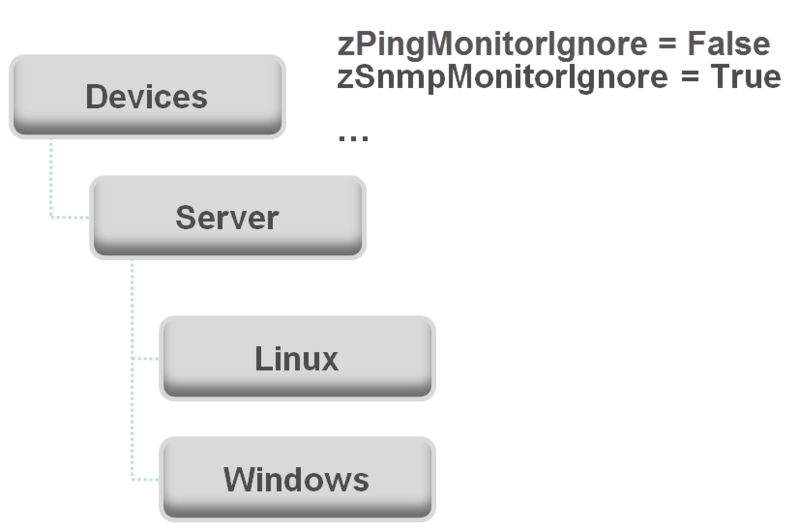
The illustration shows the following defined configuration properties:
zPingMonitorIgnore - Turns off all daemons that use ping. By default, its value at the root of the hierarchy is False.
zSNMPMonitorIgnore - Turns off all daemons that use SNMP. By default, its value at the root of the hierarchy is True.
Through inheritance, properties that are defined at the root of the hierarchy apply to all objects beneath that node. So, at the /Devices/Server/Linux level of the device class hierarchy, the value of these two properties is the same as at /Devices, even though the property is not set explicitly at /Devices/Server/Linux. Inheritance simplifies system configuration because default values that are set at the root level apply to all devices regardless of their device class.
To further customize the system, you can change a specific configuration property at a lower level of the hierarchy without changing the definitions of other configuration properties. As shown in the following illustration, the value of zPingMonitorIgnore is changed so that ping monitoring is performed at the /Devices/Server/Windows level.
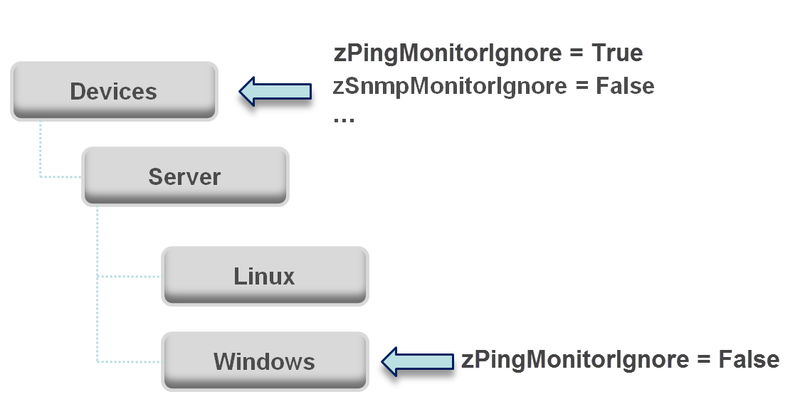
This locally defined value for zPingMonitorIgnore overrides the value that is set at the root of the hierarchy. No other properties at this level are affected by this local change; they continue to inherit the value that is set at the root.
Configuration properties allow you to configure the system at a very granular level, down to a particular device. For example, in the following illustration, for the device named dev.zenoss.com, the value of SNMPCommunity set to private. This value overrides the root value of public.
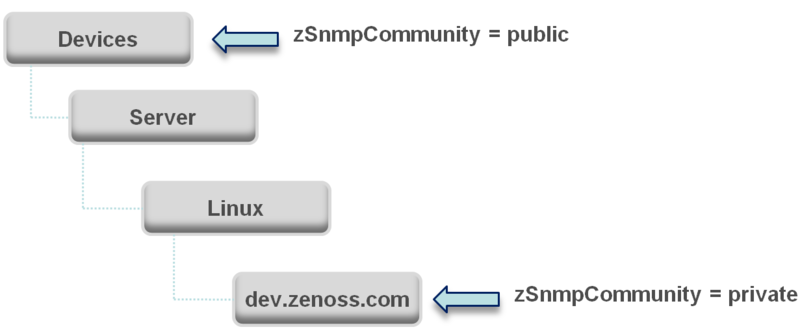
If you change the SNMPCommunity value of dev.zenoss.com to public, it matches the value that is set at the root, but is still explicitly defined. Only if you remove the locally defined property does it again inherit the value of the property that is set at the root.
Inheritance in the device class tree
Inheritance is defined by how many attributes are applied to a device at different levels in the device hierarchy. The following diagram shows an example of how and where configuration properties can be set throughout the device class tree.
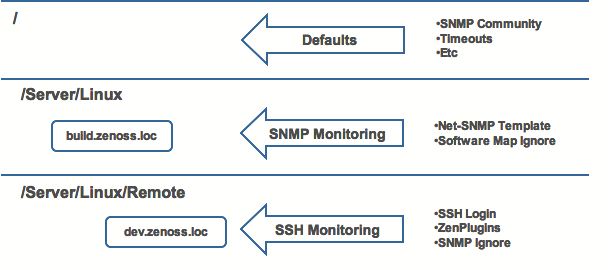
In this example, you can see that the default properties can be set at the highest level (/). However, as you travel further down the hierarchy, you see that you can override any of the configuration properties that are set at the root level.
The next two lines show how the device tree further defines properties for Linux servers. For example, to set up and use SNMP monitoring for all Linux servers (inclusive of) build.zenoss.loc, you could change these properties at the /Server/Linux level.
Further, if you wanted to change how you collect information for remote Linux servers, you could create a sub-group in /Server/Linux called /Server/Linux/Remote, setting these servers to use SSH monitoring and changing the associated properties for that sub-group.
All of these configuration properties and groupings co-exist, with any changes made lower in the hierarchy taking priority.
Configuration property types
Configuration properties are one of the following types:
String - Text value that can be ASCII or Latin-1 encoded
Integer - Whole number
Float - Number that can have a decimal value
Boolean - True or False
Lines - List of values separated by a return. The system stores these as an array.
Password - Character-masked password value
Viewing and overriding properties
Device properties
This section further illustrates the characteristics of configuration properties from the perspective of the Collection Zone interface.
From the navigation bar, choose INFRASTRUCTURE.
In the tree view, click DETAILS > Configuration Properties. The Configuration Properties page for the selected device class appears.
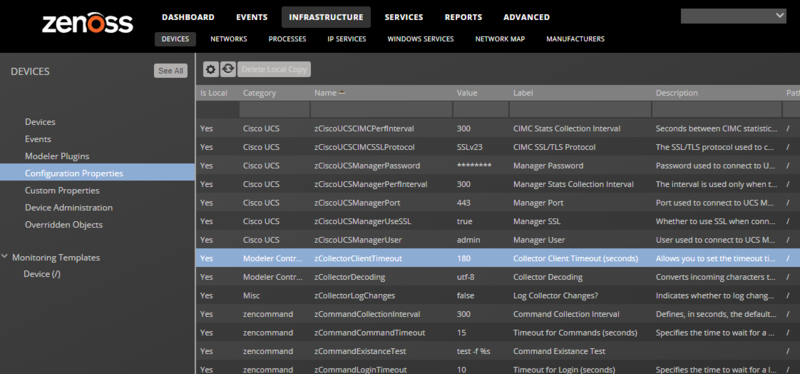
The following image shows device configuration properties that are defined at the root level. The zCollectorClientTimeout configuration property has a default value of 180.
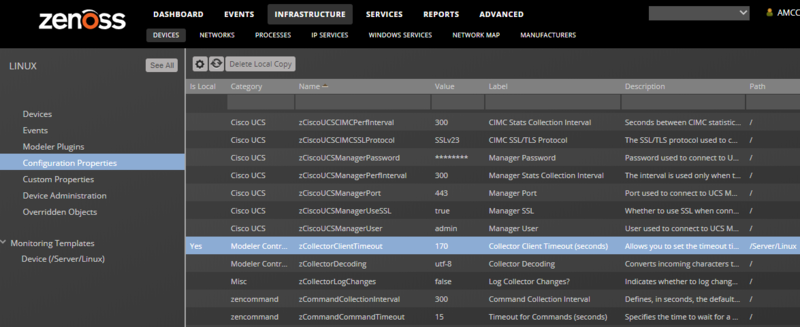
In the following example, the zCollectorClientTimeout configuration property value is set to 170 at the /Server/Linux device class. The device class value overrides the default value at this node of the hierarchy.
To remove the override and once again inherit the value from the root of the hierarchy:
Select the property in the list.
Click Delete Local Copy and, when prompted, click OK.
Event properties
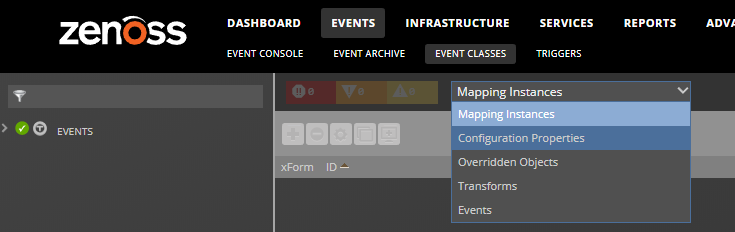
From the navigation menu, choose EVENTS > Event Classes.
From the drop-down list, choose Configuration Properties.
To view and override event configuration properties for a specific event class:
Navigate to that class, and then select Configuration Properties.
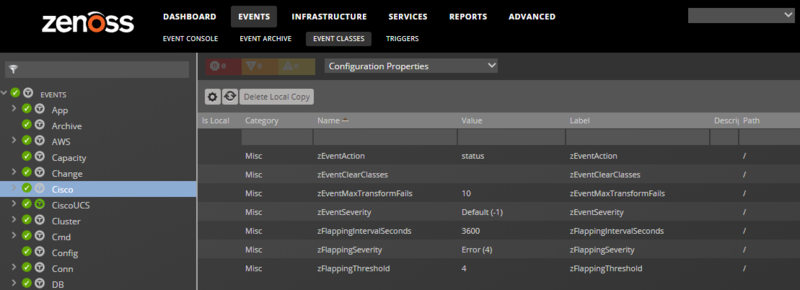
Double-click the configuration property that you want to change. The presence of Yes in the Is Local column indicates an overriding value.
In the Edit Config Property dialog box, make changes and then click SUBMIT.
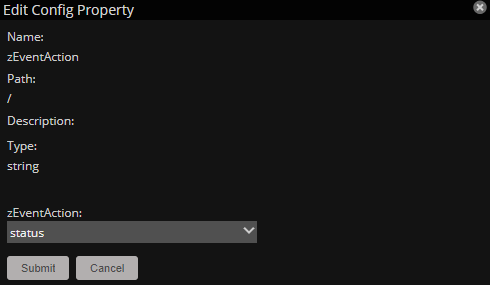
To remove an override and once again inherit the value from the root of the hierarchy:
Select the property in the list.
Click Delete Local Copy and, when prompted, click OK.
Network properties
The Networks page lists networks by IP address. You can view and change network configuration property values and inheritance selections.
From the navigation menu, choose INFRASTRUCTURE > NETWORKS.
From the Display drop-down menu, select Configuration Properties.
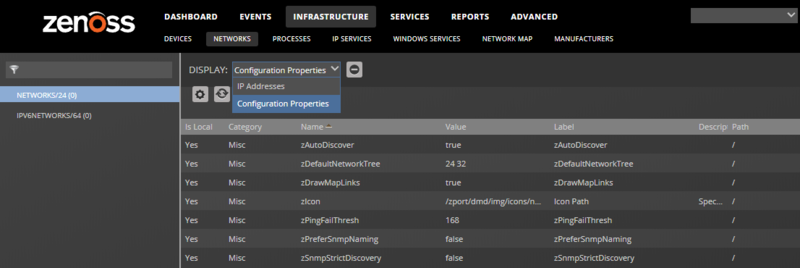
To remove an override and once again inherit the value from the root of the hierarchy:
Select the property in the list.
Click Delete Local Copy and, when prompted, click OK.
Lists of configuration properties
Device properties
Name | Type | Description |
|---|---|---|
zAWSAutoChangeProdState | boolean | Whether to enable or disable auto change of the production state for EC2 instances. Default is true (enabled). |
zAWSAutoChangeProdStateRunning | int | By default, the state is changed to Production (1000) for running EC2 instances. Specify a custom state ID number. |
zAWSAutoChangeProdStateStopped | int | By default, the production state is changed to Decommissioned (-1) for stopped EC2 instances. Specify a custom state ID number. |
zAWSBillingCostThreshold | int | Sets the spending threshold and triggers an event if spending exceeds the value. Default is 1000. |
zAWSCloudFormationEventsAutoClear | boolean | If set to True, for each CREATE_COMPLETE and DELETE_COMPLETE, the corresponding auto-clear event is generated to clear previous CRITICAL events. |
zAWSCloudWatchMaxParallel | int | Specify the number of concurrent CloudWatch calls. |
zAWSCloudWatchMaxRetries | int | Specify the number of retries for CloudWatch calls. |
zAWSCloudWatchSSL | boolean | Whether to use SSL when connecting to AWSCloudWatch API. |
zAWSDiscover | awsdiscoverfield | To configure instance guest device discovery, for the instance, specify the . Guest device discovery must be configured individually fo reach EC2 account. |
zAWSEnableSnapshotCollection | boolean | Whether to disable the collection of snapshots, thereby improving modeling performance. |
zAWSGuestCollector | string | Specify the name of the collector that all discovered devices for this AWS device use. |
zAWSGuestDeviceTitleTag | string | To populate the guest devices' titles based on an AWS tag from the instance, set the tag name. |
zAWSGuestUsePublicIPs | boolean | Whether to use a public IP address for creating guest devices. |
zAWSRegionPEM | multilinekeypath | Set the region name and path to PEM file for use in auto-discovering instance guest operating systems. |
zAWSRegionToModel | string | Narrow components that are modeled. By default, all EC2 regions and child components are discovered. Specify EC2 region name or multiple names separated by commas. |
zAWSRemodelEnabled | boolean | When disabled, only the instance state is updated on existing instances. When enabled, all instance properties are updated on existing instances, and new instances are added to the model. |
zAWSResetGuestCollector | boolean | Applies to guest devices (not EC2 account). Specifies whether to change the collector if you have set it manually. |
zAggregatorCollectionInterval | int | Aggregator collection interval in seconds. Default is 300. |
zAzureClientID | string | To model and monitor resources that were created in Azure Resource Manager Deployment Model (ARM) or Azure Cloud Solution Provider (CSP), the account must be available to authenticate requests using Azure service principal. Specify the client ID number. |
zAzureEAAccessKey | string | To enable billing data collection for Enterprise Accounts, you must specify the access key and enrollment number, and the AzureEABillingDataSourcePlugin data source plugin must be attached to monitoring template /Azure/AzureSubscription. |
zAzureEABillingCostThreshold | multilinethreshold | Sets the spending threshold and triggers an event if spending exceeds the value. |
zAzureEAEnrollmentNumber | string | To enable billing data collection for Enterprise Accounts, you must specify the access key and enrollment number, and the AzureEABillingDataSourcePlugin data source plugin must be attached to monitoring template /Azure/AzureSubscription. |
zAzureMonitoringIgnore | string | Specify a Python expression that returns a boolean value, which is evaluated against each device component. If the result is True, then the component is not monitored. |
zAzureSecretKey | string | To model and monitor resources that were created in Azure Resource Manager Deployment Model (ARM) or Azure Cloud Solution Provider (CSP), the account must be available to authenticate requests using Azure service principal. Specify the secret key. |
zAzureTenantID | string | To model and monitor resources that were created in Azure Resource Manager Deployment Model (ARM) or Azure Cloud Solution Provider (CSP), the account must be available to authenticate requests using Azure service principal. Specify the tenant ID number. |
zCiscoACEUseSSL | boolean | Whether to use SSL when connecting to ACE XML API. |
zCiscoNXAPIInterval | int | Value in seconds of the rediscovery interval using the Cisco NX-API protocol. Default value is 300. |
zCiscoNXAPIPort | int | Port for connecting to NX-API. |
zCiscoNXAPIUseSSL | boolean | Whether to use SSL when connecting to NX-API. |
zCiscoRemodelEventClassKeys | lines | Allows you to modify the list of SNMP traps that will cause the product schedule an immediate remodeling of the device from which the trap was sent. |
zCiscoUCSCIMCEventsInterval | int | Event collection interval in seconds. Default is 60. |
zCiscoUCSCIMCPerfInterval | int | Metric collection interval in seconds. Default is 300. |
zCiscoUCSCIMCSSLProtocol | string | The SSL/TLS protocol used to connect to a CIMC device. |
zCiscoUCSManagerPassword | password | Password for UCS Manager user name. |
zCiscoUCSManagerPerfInterval | int | Seconds between UCS Manager statistics collections. Default value is 300. |
zCiscoUCSManagerPort | int | Port used to connect to the UCS Manager or CIMC XML APIs. Default is 443 and typically should not be changed. |
zCiscoUCSManagerUseSSL | boolean | Whether to use SSL when connecting to the UCS Manager or CIMC XML APIs. Default is true and typically should not be changed. |
zCiscoUCSManagerUser | string | UCS Manager user name. |
zCollectorClientTimeout | int | Allows you to set the timeout time of the collector client in seconds |
zCollectorDecoding | string | Converts incoming characters to Unicode. |
zCollectorLogChanges | boolean | Indicates whether to log changes. |
zCommandCollectionInterval | int | The default collection interval (number of seconds) for command datasources. |
zCommandCommandTimeout | float | Specifies the time to wait for a command to complete. |
zCommandLoginTimeout | float | Specifies the time to wait for a login prompt. |
zCommandLoginTries | int | Sets the number of times to attempt login. |
zCommandPassword | password | Specifies the password to use when performing command logins and SSH. |
zCommandPath | string | Sets the default path where ZenCommand plug-ins are installed on Collection Zone (or on a remote box where SSH is used to run the command). |
zCommandPort | int | Specifies the port to connect to when performing command collection. |
zCommandProtocol | string | Establishes the protocol to use when performing command collection. Possible values are SSH and telnet. |
zCommandSearchPath | lines | Sets the path to search for any commands. |
zCommandUserCommandTimeout | float | Specifies the number of seconds to wait for a user command to complete. |
zCommandUsername | string | Specifies the user name to use when performing command collection and SSH. |
zControlCenterHost | string | Control Center host name. Defaults to device name. |
zControlCenterModelCycle | int | Control Center modeling interval. Defaults to 3600s. |
zControlCenterPassword | password | Password for the Control Center user name. |
zControlCenterPerfCycle | int | Control Center performance collection interval. Defaults to 300s. |
zControlCenterPort | int | Port for Control Center. Defaults to HTTPS TCP/443 |
zControlCenterUser | string | Control Center user name. |
zDBInstances | *** | ***instancecredentials. This setting is only relevant when the zenoss.winrm.WinMSSQL modeler plugin is enabled. Multiple instances can be specified to monitor multiple SQL Server instances per server. The default instance is MSSQLSERVER. Fill in the user and password to use SQL authentication. Leave the user and password blank to use Windows authentication. |
zDatasourceDebugLogging | boolean | True or False to debug calculated/aggregated data sources on a single device. |
zDeviceTemplates | lines | Sets the templates associated with this device. Linked by name. |
zDockerMonitorContainerSize | boolean | True or false to monitor the real size and virtual size of each container once every ten minutes. The default is false (not enabled) because the command takes a long time to run when many containers, or large containers are used. |
zDockerMonitorContainerStats | boolean | True or false to collect the statistics of each container once every five minutes. The default is true (enabled). |
zDockerMonitorContainerStatus | boolean | True or false to check the status of the Docker daemon once per minute. The default is true (enabled). |
zDiscoveryMappingOn | boolean | True or False to determine whether discovered devices are automatically moved to device classes that match their hardware and operating system. If False (disabled), devices are not moved from the /Discovered device class. |
zEnablePassword | boolean | True or False to specify use of password for Cisco routers. |
zFileSystemMapIgnoreNames | string | Sets a regular expression of file system names to ignore. |
zFileSystemMapIgnoreTypes | lines | Do not use. |
zFileSystemSizeOffset | int | SNMP typically reports the total space available to privileged users. Collection Zone (like the |
zHardDiskMapMatch | string | Regular expression that uses the disk ID in the diskstats output to filter disk activity statistics for inclusion in performance monitoring. |
zHyperVDiscoverGuests | boolean | True or false to discover virtual machine guest devices. Guest device discovery must be configured individually for each Hyper-V server. The default is false. |
zILOCollectSamples | boolean | True or false to collect and save raw data for debug purposes. |
zILOPassword | password | The ILO authentication password. Data from ILO devices is provided by a HTTPS interface listening on port 443. The following properties control access to ILO devices: zILOUserName, zILOPassword, zILOUseSSL, and zILOPort. |
zILOPort | string | The TCP port for ILO communication. Data from ILO devices is provided by a HTTPS interface listening on port 443. The following properties control access to ILO devices: zILOUserName, zILOPassword, zILOUseSSL, and zILOPort. |
zILOUseSSL | boolean | True or false to use HTTPS for ILO communication. Data from ILO devices is provided by a HTTPS interface listening on port 443. The following properties control access to ILO devices: zILOUserName, zILOPassword, zILOUseSSL, and zILOPort. |
zILOUserName | string | The ILO user name. Data from ILO devices is provided by a HTTPS interface listening on port 443. The following properties control access to ILO devices: zILOUserName, zILOPassword, zILOUseSSL, and zILOPort. |
zIcon | lines | Specifies the icon to represent the device wherever device icon is shown, such as on the network map and device status page. |
zIdiomPassword | password | IDIOM API password for Cisco IDS/IPS devices. |
zIdiomUsername | string | IDIOM API username for Cisco IDS/IPS devices. |
zIfDescription | boolean | Shows the interface description field in the interface list. |
zIgnoreUnmounted | boolean | True or false to specify whether to ignore unmounted drives. |
zInterfaceMapIgnoreDescriptions | string | Filters out interfaces based on description. |
zInterfaceMapIgnoreNames | string | Filters out interfaces that should not be discovered. If you want to use an expression to define this property, note that only Python regular expressions are valid. |
zInterfaceMapIgnoreTypes | string | Filters out interface maps that should not be discovered. |
zIpServiceMapMaxPort | int | Specifies the highest port to scan. The default is 1024. |
zJmxAuthenticate | boolean | True or False to enable/disable authentication. |
zJmxManagementPort | int | Port that enables JMX management |
zJmxPassword | password | JMX username password |
zJmxUsername | string | JMX username |
zKeyPath | string | Sets the path to the SSH key for device access. |
zLDOMsAutodiscover | boolean | Specify true or false for auto-discovery of LDOMs. |
zLTMVirtualServerIgnoreNames | string | Regular expression that can be used to prevent matching LTM Virtual Servers from being modeled. |
zLinks | string | Specifies a place to enter any links associated with the device. |
zLocalInterfaceNames | string | Regular expression that uses interface name to determine whether the IP addresses on an interface should be incorporated into the network map. For instance, a loopback interface "lo" might be excluded. |
zLocalIpAddresses | string | Specifies IP addresses that should be excluded from the network map (for example, 127.x addresses). If you have addresses that you reuse for connections between clustered machines, you might add those addresses. |
zMaxOIDPerRequest | int | Sets the maximum number of OIDs to be sent by the SNMP collection daemons when querying information. Some devices have small buffers for handling this information, so a lower value might be appropriate. |
zMySQLConnectionString | multilinecredentials | Specifies a list of properties (user, password, and port) for MySQL connections. |
zMySqlPassword | password | MySQL user password |
zMySqlPort | string | MySQL connection port |
zMySqlTimeout | int | MySQL timeout. Default value is 30s. |
zMySqlUsername | string | MySQL user name. |
zNetAppNumRecordsPerRequest | int | Number of records per NetApp Monitor request. Default is 100. |
zNetAppSSL | boolean | Boolean true or false to enable SSL use with the NetApp Monitor. |
zNmapPortscanOptions | string | Options used on nmap when scanning ports. Used in IpServiceMap. |
zNodesAutodiscover | boolean | Specify true or false for auto-discovery of nodes. |
zPingMonitorIgnore | boolean | Specify whether to ping the device. |
zProdStateThreshold | int | Production state threshold at which Collection Zone will begin to monitor a device. |
zPropertyMonitorInterval | int | Polling interval of the configured property data sources. System-wide setting. Default is 300s. |
zPythonClass | string | DO NOT USE |
zRMMonCCHost | string | Host name or IP address of the Control Center instance on which the Collection Zone to monitor is running. |
zRMMonCCUser | string | User name of the Control Center instance on which Collection Zone is running. |
zRMMonCCPassword | password | Password for the Control Center user name. |
zRMMonCCPort | int | Port for Control Center. Defaults to HTTPS TCP/443. |
zRMMonRabbitPassword | password | Password for the RabbitMQ user name. Defaults to the system default. |
zRMMonRabbitUser | string | User name for RabbitMQ. Defaults to the system default. |
zRMMonTenantHost | string | Collection Zone host name. |
zRMMonTenantPassword | password | Password for the Collection Zone user name. |
zRMMonTenantPerfCycle | int | Performance collection interval. Defaults to 30s. |
zRMMonTenantPort | int | Port for Collection Zone. Defaults to HTTPS TCP/443. |
zRMMonTenantUseSsl | boolean | True or false value to use SSL. Defaults to true. |
zRMMonTenantUser | string | Collection Zone user name. |
zRouteMapCollectOnlyIndirect | boolean | Only collect routes that are indirectly connected to the device. |
zRouteMapCollectOnlyLocal | boolean | Only collect local routes. (These usually are manually configured rather than learned through a routing protocol.) |
zRouteMapMaxRoutes | int | Sets maximum number of routes to collect. Default value is 500. |
zSnmpAuthPassword | password | The shared private key used for authentication. Must be at least 8 characters long. |
zSnmpAuthType | string | Use "MD5" or "SHA" signatures to authenticate SNMP requests |
zSnmpCollectionInterval | int | Defines, in seconds, how often the system collects performance information for each device. |
zSnmpCommunities | lines | Array of SNMP community strings used by the Network Discovery wizard when collecting SNMP information. When you set this property, communities are tried in order; the first in the list that is successful is used as zSnmpCommunity. If none is successful, then the current value of zSnmpCommunity is used. The default value for the entire system is "public." |
zSnmpCommunity | string | Community string to be used when collecting SNMP information. If it is different than what is found by ZenModeler, it will be set on the modeled device. |
zSnmpContext | string | Configures zSNMP context to map logical network entity such as a topology or protocol instance. |
zSnmpDiscoveryPorts | int | List of UDP ports to try when performing SNMP discovery. Defaults to 161 if not set. |
zSnmpEngineId | string | SNMPv3 engine ID for the device. Will be discovered when SNMPv3 is used. |
zSnmpMonitorIgnore | boolean | Whether or not to ignore monitoring SNMP on a device. |
zSnmpPort | int | Port that the SNMP agent listens on. |
zSnmpPrivPassword | password | The shared private key used for encrypting SNMP requests. Must be at least 8 characters long. |
zSnmpPrivType | string | "DES" or "AES" cryptographic algorithms. |
zSnmpSecurityName | string | The Security Name (user) to use when making SNMPv3 requests. |
zSnmpTimeout | float | Timeout time in seconds for an SNMP request |
zSnmpTries | int | Amount of tries to collect SNMP data |
zSnmpVer | string | SNMP version used. Valid values are v2c, v1 |
zSshConcurrentSessions | int | Maximum number of sessions supported by the remote device's MAX_SESSIONS parameter. Common values for AIX are 2 or 10. |
zStatusConnectTimeout | float | The amount of time that the zenstatus daemon should wait before marking an IP service down. |
zSysedgeDiskMapIgnoreNames | string | Regular expression used by zenoss.snmp.SysedgeDiskMap modeler plugin. Disks with matching names will not be modeled. |
zTelnetEnable | boolean | When logging into a Cisco device issue the enable command to enable access during command collection. |
zTelnetEnableRegex | string | Regular expression to match the enable prompt. |
zTelnetLoginRegex | string | Regular expression to match the login prompt. |
zTelnetPasswordRegex | string | Regular expression to match the password prompt. |
zTelnetPromptTimeout | float | Time to wait for the telnet prompt to return. |
zTelnetSuccessRegexList | lines | List of regular expressions to match the command prompt. |
zTelnetTermLength | boolean | On a Cisco device, set term length to Zero. |
zUsesManageIp | boolean | True or False to specify use of manage IP. Used to avoid setting manage IP when a device is added. Default is True for most device classes. For the /ZenossRM device class, default is False to allow modeling many Collection Zone instances per Control Center without manage IP collisions. |
zUsesStandardDeviceCreationJob | boolean | True or False to specify whether to use the standard device creation job. |
zVSphereEndpointHost | string | vSphere host name |
zVSphereEndpointPassword | password | vSphere username password |
zVSphereEndpointPort | int | Port that is used to connect to vSphere Endpoint. |
zVSphereEndpointUseSsl | boolean | vSphere boolean true or false for SSL use |
zVSphereEndpointUser | string | vSphere username |
zVSphereHostCollectionClusterWhitelist | lines | The whitelist filters the hosts that are monitored, based on cluster names. |
zVSphereHostPingBlacklist | lines | List of regular expressions to control which management IP address to ping (matches against hostname:nicname:ip). Note: zVSphereHostPingWhitelist takes precedence over zVSphereHostPingBlacklist. |
zVSphereHostPingWhitelist | lines | List of regular expressions to control which management IP address to ping (matches against hostname:nicname:ip). Note: zVSphereHostPingWhitelist takes precedence over zVSphereHostPingBlacklist. |
zVSphereHostSystemPassword | password | Password that is used to access ESX hosts via ssh and API. |
zVSphereHostSystemUser | string | User name that is used to access ESX hosts via ssh and API. |
zVSphereLUNContextMetric | boolean | Controls whether to use LUN-specific metric names when storing performance data. Note: The default value is False. Changing the value to True causes historical metrics to become inaccessible. For more information, please contact Virtana Support. |
zVSphereModelCache | lines | vSphere model cache |
zVSphereModelIgnore | lines | vSphere model ignore |
zVSphereModelMpIndexObjs | int | Advanced tuning parameter. For more information, please contact Virtana Support. |
zVSphereModelMpLevel | int | Advanced tuning parameter. For more information, please contact Virtana Support. |
zVSphereModelMpObjs | int | Advanced tuning parameter. For more information, please contact Virtana Support. |
zVSpherePerfDelayCollectionMinutes | int | Value of how long to lag performance data collection. Default value is 0. |
zVSpherePerfMaxAgeMinutes | int | Default value is 28 minutes. |
zVSpherePerfParallelQueries | int | Default value is 6. |
zVSpherePerfQueryChunkSize | int | Value of how many performance requests to make at a time. Default value is 250. |
zVSpherePerfQueryRaw20 | boolean | Default value is true. |
zVSpherePerfQueryTimeout | int | Default value is 200. |
zVSpherePerfQueryVcChunkSize | int | Default value is 64. |
zVSpherePerfQueryVcRaw20 | boolean | Default value is false. |
zVSpherePerfRecoveryMinutes | int | Default value is 240 minutes. |
zVSpherePerfTimeoutRecoveryMinutes | int | When a timeout error occurs in querying a specific metric, it is "blacklisted" for this number of minutes before it is retried. This action avoids repeated errors due to attempts to query a metric that is not working properly. The default is one hour. If gaps appear in the graphs, you can safely lower the value. |
zVSphereVMContextMetric | boolean | Controls whether to use VM-specific metric names when storing performance data. Note: The default value is False. Changing the value to True causes historical metrics to become inaccessible. For more information, please contact Virtana Support. |
zWBEMPassword | password | WBEM password |
zWBEMPort | int | Value of the WBEM port number. Default value is 5989. |
zWBEMUseSSL | boolean | True or false value to use SSL. Default value is true. |
zWBEMUsername | string | WBEM username |
zWebTxAgent | string | Default value is ZenWebTx/1.0. |
zWebTxPassword | password | WebTx password |
zWebTxRealm | string | WebTx realm |
zWebTxUser | string | WebTx user |
zWebsphereServer | string | Used by the provided template to build the xpath queries for the data to collect. You must supply a value for this field. For example: serverAB, There is no default value. |
zWebsphereURLPath | string | Path to the PMI servlet on a WebSphere instance. The default value is the default path on aWebSphere installation: wasPerTool/servlet/perfservlet |
zWinKDC | string | IP address or fully-qualified domain name of a valid Windows domain controller. Must be set if domain authentication is used. |
zWinKeyTabFilePath | string | This property is currently used and reserved for future use when keytab files are supported. |
zWinPerfmonInterval | int | Interval, in seconds, at which Windows Perfmon datapoints will be collected. Default value is 300. It is possible to override the collection interval for individual counters. |
zWinRMClusterNodeClass | string | Path under which to create cluster nodes. |
zWinRMEnvelopeSize | int | Used when WinRM configuration setting "MaxEnvelopeSizekb" exceeds default of 512k. |
zWinRMKrb5DisableRDNS | boolean | Set to true to disable reverse DNS lookups by Kerberos. Only set at /Server/Microsoft level. |
zWinRMKrb5includedir | string | Directory path for Kerberos configuration files. |
zWinRMLocale | string | Communication locale to use for monitoring. Reserved for future use. |
zWinRMPassword | password | Password for the user defined by zWinRMUser |
zWinRMPort | int | The port on which the Windows server is listening for WinRM or WS-Management connections. Default value is 5985. It is uncommon for this to be configured as anything else. |
zWinRMServerName | string | This property should only be used in conjunction with domain authentication when the DNS PTR record for a monitored server's managed IP address does not resolve to the name by which the server is known in Active Directory. For example, if myserver1 is known as myserver1.ad.example.com by Active Directory and is being managed by IP address 192.51.100.21, but 192.51.100.21 resolves to www.example.com, you will have to set zWinRMServerName to myserver1.ad.example.com for domain authentication to work. If many Windows servers in your environment do not have DNS PTR records that match Active Directory, it is recommended that you set the name of the Collection Zone device to be the fully-qualified Active Directory name and set zWinRMServerName to |
zWinRMUser | string | The syntax used for zWinRMUser controls whether Collection Zone will attempt Windows local authentication or domain (Kerberos) authentication. If the value of zWinRMUser is username, local Windows authentication will be used. If zWinRMUser is username@example.com, domain authentication will be used. The zWinKDC and potentially the zWinRMServerName properties become important. |
zWinRSCodePage | int | Code page used by monitoring user account. |
zWinScheme | string | Must be set to http or https. Default value is http. |
zWinTrustedKDC | string | Windows Trusted KDC. |
zWinTrustedRealm | string | Windows Trusted Realm. |
zWinUseWsmanSPN | boolean | Set to true if HTTP/HTTPS service principles are exclusively for use by a particular service account. |
zWSMANPassword | password | Password for WSMAN user name. |
zWSMANPort | int | The port number used to gather WSMAN information. Defaults to 443. |
zWSMANUseSSL | boolen | True or false value to use SSL. Default value is true. |
zWSMANUsername | string | WSMAN user name. |
Event properties
Name | Type | Description |
|---|---|---|
zEventAction | string | Specifies the database table in which an event will be stored. Possible values are: status, history and drop. Default is status, meaning the event will be an active event. History sends the event |
directly to the history table. Drop tells the system to discard the event. | ||
zEventClearClasses | lines | Lists classes that a clear event should clear (in addition to its own class). |
zEventMaxTransformFails | int | After the specified number of failures, disable bad transforms from executing. Default is 10. |
zEventSeverity | int | Overrides the severity value of events from this class. Possible values are |
zFlappingIntervalSeconds | int | Defines the time interval to check for event flapping (changing severity level repeatedly). Default value is 3600 seconds. |
zFlappingSeverity | int | Drop-down list to set the severity to check for event flapping. If the severity level on an event changes from this value a certain number of times (zFlappingThreshold) within a certain time range (zFlappingIntervalSeconds) then an event flapping event is generated. Possible values are |
zFlappingThreshold | int | Number of times an event severity must flap within an interval. One of the parameters to define in order to generate event flapping events. |
Network properties
Name | Type | Description |
|---|---|---|
zAutoDiscover | boolean | Specifies whether the zendisc service should perform auto-discovery on this network. (When performing network discovery, this property specifies whether the system should discover devices and subnets on the network.) |
zDefaultNetworkTree | lines | A network subnet is automatically created for each modeled device, based on that device’s subnet mask setting. To create higher-level subnets automatically from the discovery and modeling processes, add the specific subnet mask breakpoints. For example: 8, 16. If you then model a device with, for example, an IP address of 192.0.2.0, and a subnet mask of 255.255.255.0 (corresponding to a /24 subnet), device discovery will create a 192.0.0.0/8 network containing 192.0.2.0/16, containing 192.0.2.0/24, containing your device. |
zDrawMapLinks | boolean | Calculating network links “on the fly” is resource-intensive. If you have a large number of devices that have been assigned locations, then drawing those map links may take a longtime. You can use this property to prevent the system from drawing links for specific networks (for example, a local network comprising many devices that you know does not span multiple locations). |
zIcon | string | Use to specify device icons that appear on the device status page, Dashboard, and network map. |
zPingFailThresh | int | Specifies the number of pings sent without being returned before the zendisc service removes the device. |
zPreferSnmpNaming | boolean | Specifies that when network discovery occurs, it uses the device name comes from SNMP rather than reverse DNS. |
zSnmpStrictDiscovery | boolean | Specifies that if SNMP does not exist on the device during network discovery, ignore the device. |