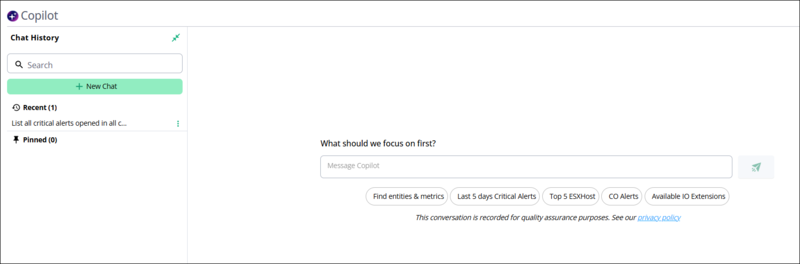
Copilot page and conversation management
SNMP Operations queries a device with SNMP Get, SNMP Walk, or SNMP Bulk Walk. Use this option to retrieve MIB values from probes, switches, or other data center components that support SNMP.
Select the SNMP Operations option.
In the Hostname / IP field, enter the hostname or IP address of the device that you want to query.
Optional: In the SNMP Timeout (sec) and SNMP Max Timeouts fields, enter values to override the defaults.
From the SNMP Version list, select the SNMP version that the device uses.
In the Community field, enter the SNMP community string for the device.
From the Operation Type list, select SNMP Get, SNMP Walk, or SNMP Bulk Walk.
In the OID field, enter the object identifier that you want to query, and click Execute. | Virtana IO lists the device's response in the results pane below the form. |
|---|---|
IF-MIB::ifName.805306369 = STRING: eth0 | IF-MIB::ifName.805306370 = STRING: lo |
<listitem> SNMP Get: Retrieves the value of a specific OID from the device. For example, use SNMP Get to retrieve the CPU utilization for a particular OID. SNMP Walk: Retrieves multiple OIDs sequentially under a specified OID subtree. Use this operation to discover and collect a set of related metrics, for example to walk the interface OID and retrieve information for all interfaces. SNMP Bulk Walk: Retrieves multiple OIDs in a single request using SNMP GETBULK. This operation is generally faster and more efficient than SNMP Walk when you collect large amounts of data. | Finds a saved conversation. Enter text in the box to show only the saved chats that match what you enter. |
+ New Chat | Clears the conversation area and starts a new conversation. Copilot shows the What should we focus on first? start screen. |
SNMP versions and security levels | The SNMP Version list determines the protocol version and security level that Virtana IO uses to communicate with the device. |
<listitem> v1: Uses the original SNMP protocol version. It provides basic monitoring with limited security. v2c: An updated SNMP version that supports improved data retrieval and performance. It uses a community string for access control. v3 Auth Privacy: Uses SNMPv3 with authentication and encryption to secure communication. v3 Auth No Privacy: Uses SNMPv3 with authentication but no encryption. v3 No Auth No Privacy: Uses SNMPv3 with no authentication and no encryption. | Groups the chats that you pinned. A chat stays in Pinned until you unpin it, which keeps a recurring or high-priority conversation easy to find. |
Extensions status | Located at the bottom of the sidebar. Displays connected extensions (for example, io-demo21) along with their availability status and summary count. |
The following table describes the actions in the chat options  menu.
menu.
Action | Description |
|---|---|
Pin | Moves the chat from the Recent group to the Pinned group in the Chat History sidebar. |
Unpin | Moves the chat from the Pinned group back to the Recent group in the Chat History sidebar. |
Rename | Replaces the chat title that Copilot generated with a title that you enter. |
Delete | Removes the chat from your chat history permanently. |
Conversations
The Copilot page saves each conversation to your user account, so you can return to a question and its answer instead of asking again. Virtana refers to this behavior as user-level chat persistence: a saved conversation belongs to the user account that created it, and other users do not see it.
Your saved conversations remain available after you sign out and sign back in. The floating Copilot window does not include the Chat History sidebar, so use the Copilot page when you want to reopen a saved conversation.
When no conversation is open, the Copilot page shows the What should we focus on first? start screen. The suggested prompts appear as buttons below the Message Copilot box. Suggested prompts are ready-made questions that Copilot offers on the Copilot page when you start a new conversation. Use a suggested prompt as a starting point when you are not sure how to phrase a question, or edit the prompt to match your environment before you send it.