Zoom connector
Virtana Service Observability provides a ready-made connector for your Zoom platform. After you set up the Zoom connector, you can monitor metrics for your Zoom platform.
Before you begin
Virtana Service Observability uses Server-to-Server OAuth app credentials to gain access to your Zoom environment. For more information, see the Zoom documentation and enable access before adding Zoom credentials. To add a new Zoom credential in Virtana Service Observability, see Add Zoom credentials.
Set up a Zoom connector
Note
Your account must be assigned the Roles and permissions role to create and manage connectors.
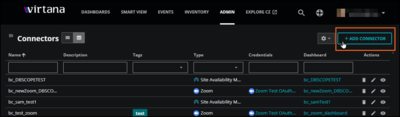
Log in to Virtana Service Observability as a user with the Manager role, and then open the ADMIN > Connectors page. Click ADD CONNECTOR.
On the SELECT CONNECTOR TYPE dialog box, click the Zoom card. The ADD CONNECTOR dialog box opens.
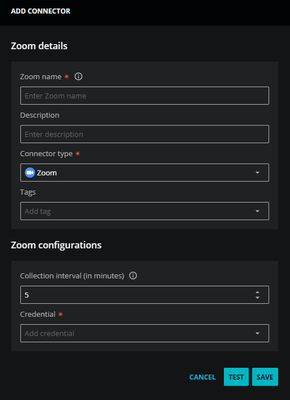
In the Zoom details section, add general information about your application.
In the Zoom Name field, enter a unique name for your application connector.
The name you choose is used as the source name for the data Virtana Service Observability collects.
(Optional) In the Description field, enter text to associate with your Zoom connector.
Keep the Connector type as Zoom.
(Optional) In the Tags field, enter one or more terms to associate with your Zoom connector.
In the Zoom configurations section, set an optional collection interval, then select an existing credential or create a new one.
Set the Collection interval. The default setting is 5 minutes.
In the Credential list, select an existing credential or create a new one. When you choose Create new credential, the dialog box expands to include fields for creating a new credential for Zoom.
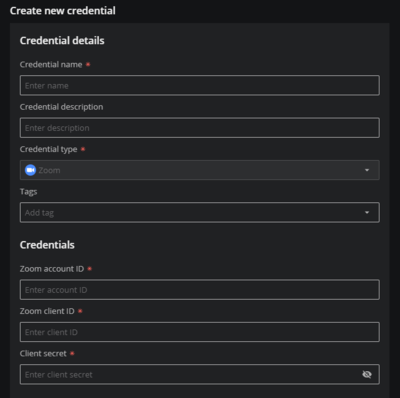
For more information about creating a new credential, see Add Zoom credentials.
(Optional) Click TEST to test your configuration before saving. A success or error message appears.
Click SAVE.
To view the metrics Virtana Service Observability collects, Copy a dashboard template or Create a new dashboard.
Zoom metric data
View the metrics for Zoom connectors in the following tables. Zoom connector metrics include metrics for the dashboard, reports, and billing.
Dashboard metrics
Metric | Metric label | Units | Description |
|---|---|---|---|
| Meeting - Participant Count | Count | The total number of participants in a meeting |
| Meeting - Duration | seconds | Duration of the meeting in seconds |
| Chat - Total Sent | chats | The total count of all messages sent |
Reports metrics
Metric | Metric label | Units | Description |
|---|---|---|---|
| Cloud Recording - Free Usage | bytes | Amount of free usage available for cloud recordings |
| Cloud Recording - Plan Usage | bytes | Amount of total paid storage available for cloud recordings |
| Cloud Recording - Usage | bytes | Amount of storage used for cloud recordings |
| Daily Usage - Meeting Minutes | minutes | The total meeting minutes per day from Reports |
| Daily Usage - Meeting Count | meetings | The total number of meetings per day from Reports |
| Daily Usage - New Users | users | The number of new users in a meeting per day from Reports |
| Daily Usage - Participant Count | participants | The total number of meeting participants per day from Reports |
| Reports - Meeting Participants count | participants | The total number of participants in all meetings attended by the user |
| Reports - Meeting Duration | minutes | The total meeting duration of all the meetings attended by the user |
| Reports - Meeting Total Minutes | minutes | The total minutes of all the meetings attended by the user |
Billing metrics
Metric | Metric label | Units | Description |
|---|---|---|---|
| Plan Base - Hosts | count | Number of hosts in the base plan |
| Plan Base - Usage | count | Total usage in the base plan |
| Plan Base - Pending | count | Total number of pending licenses in the base plan |
| Plan Recording - Free Storage | bytes | Amount of free storage available in Plan Recording |
| Plan Recording - Free Storage Usage | bytes | Amount of free storage used in Plan Recording |
| Plan Recording - Plan Storage | bytes | Amount of plan storage in Plan Recording |
| Plan Recording - Plan Storage Exceed | bytes | Amount of plan storage exceeded in Plan Recording |
| Plan Recording - Plan Storage Usage | bytes | Amount of plan storage used in Plan Recording |