Additional settings
The Additional Settings section provides supplementary configuration and operational guidance for managing the GV OVA deployment beyond the standard installation. You can refer to this section when performing post-deployment maintenance activities, such as including version upgrades, certificate rotation, and network troubleshooting, to ensure your Global View environment remains connected to the underlying infrastructure.
Upgrade the K3s Kubernetes version
Check the Current K3s Version and the node's health. To display the current Kubernetes version managed by K3s and the node's health, run the following commands in your terminal:
sudo k3s kubectl version
sudo k3s kubectl get nodes
sudo k3s kubectl get pods -n kube-system
Find the latest stable K3s version. To determine the latest stable K3s release available, run the following commands:
curl -s https://update.k3s.io/v1-release/channels | jq -r '.data[] | select(.id == "stable") | .latest'
Review the K3s release notes for version-specific considerations.
Take a Full VM Backup (Including Disk) in VMware
Important
Before any cluster upgrade, create a full backup of your VM, including all attached disks, using VMware vSphere or your preferred management tool.
In vSphere Web Client, right-click the VM > Snapshot > Take Snapshot. Enable Snapshot the virtual machine's memory and Quiesce guest file system for best protection.
Verify backup completion before proceeding.
Upgrade to the Target K3s Version. Replace <<K3s_VERSION>> below with the desired version string retrieved from Upgrade Strategy. The following command will upgrade K3s to that version with customized install options:
curl -sfL https://get.k3s.io | sudo INSTALL_K3S_VERSION="<<K3s_VERSION>>" INSTALL_K3S_EXEC="--flannel-backend=none --disable traefik --disable servicelb --write-kubeconfig-mode 644" sh -s -
Post-upgrade verification. To display the current Kubernetes version managed by K3s and the nodes' health, run:
sudo k3s kubectl version
sudo k3s kubectl get nodes
sudo k3s kubectl get pods -n kube-system
Manage K3s certificates
K3s relies on a set of TLS certificates to secure communication between the Kubernetes control plane, the kubelet, and cluster components. You can check the certificate validity, interpret expiration warnings, and manually rotate certificates when automatic renewal is not sufficient.
To check the expiration dates of your certificates, run the following command:
sudo k3s certificate check --output table
The following table provides the details that you must check for the relevant certificate:
Property | Details |
|---|---|
Default validity | K3s server and client certificates are valid for 365 days (1 year) from their issuance date. |
CA certificate validity | Typically valid for 10 years. |
Alerts | Kubernetes event |
Automatic renewal | K3s auto-renews expired certificates, or within 90 days of expiry, on every service restart. |
You can manually rotate certificates using the K3s CLI with the following command:
sudo k3s certificate rotate
sudo systemctl restart k3s
KVM - VM Networking
KVM - VM Networking defines hosting of VMs on a KVM hypervisor to communicate with the underlying host, physical network, and external services. Understanding this networking model helps you correctly configure VM IP addresses, VLAN tagging, and DNS routing, as well as troubleshoot connectivity issues between the GV VM, its internal Kubernetes pods, and external services such as DNS, SMTP, or upstream APIs.
Host Linux bridge
The host Linux bridge acts as a software switch, connecting VM network interfaces directly to the host's physical NIC. This allows VMs to appear as first-class nodes on the physical network, enabling full Layer 2 connectivity without NAT.
The following diagram illustrates the traversal of network packets through the host’s physical NIC, VLAN interfaces, and bridges before reaching the VM, and how traffic originating from the VM flows back to the external network.
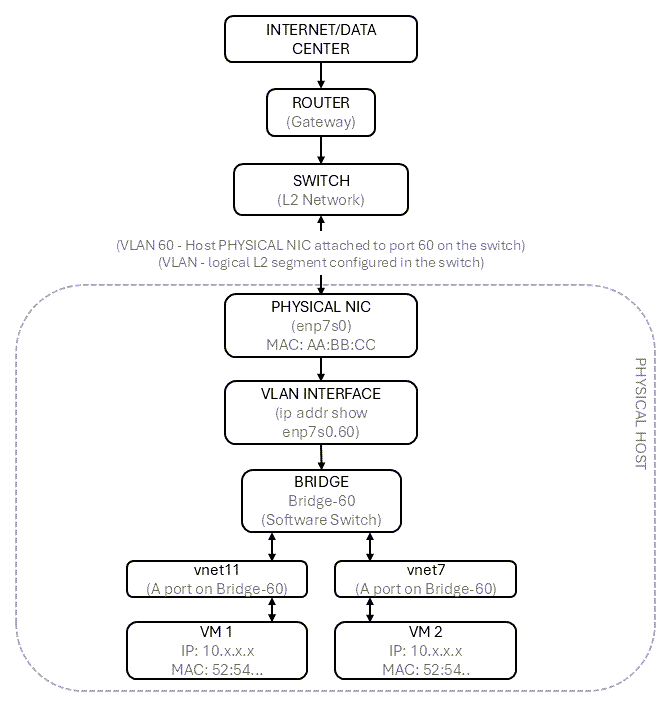
Packet flow
Inside the VM, a packet leaves
eth0and hits the host'svnetXvia a tap/virtual link.vnetXis a port on Bridge-60 that forwards traffic into the bridge.Bridge-60routes external traffic out via its uplinkenp7s0.60(VLAN 60 sub-interface).enp7s0.60tags/untags VLAN 60 on the way to the physical NICenp7s0, which puts bits on the wire.
DNS traffic flow
Understanding the DNS traffic path is important for troubleshooting name resolution issues, validating network connectivity, and ensuring that both the VM and its workloads (running on K3s) can reliably reach upstream DNS services through the configured bridge network.
VM-level DNS resolution path
Even though the VM subnet is 10.10.60.0/23, DNS servers at 10.10.2.6/7 are reachable through normal routing:
GV VM (10.10.60.101) -> vnet12 (tap) -> Bridge-60 -> enp7s0.60 -> physical switch/router -> DNS (10.10.2.6/7)
Return: 10.10.2.6 -> router -> VLAN 60 -> enp7s0.60 -> Bridge-60 -> vnet12 -> VM
So VM and host are both just regular nodes on 10.10.60.0/23 that can reach DNS at 10.10.2.6/7 through routing.
Pod-level DNS resolution path
Inside the GV VM running K3s (pod CIDR: 10.43.0.0/16, CoreDNS service: 10.43.0.10):
Pod (10.43.A.B) -> kube-proxy/iptables -> CoreDNS service (10.43.0.10) -> CoreDNS pod
-> GV VM kernel routing -> vnet12 -> Bridge-60 -> enp7s0.60 -> physical switch/router -> External DNS
Return: External DNS -> router -> VLAN 60 -> enp7s0.60 -> Bridge-60 -> vnet12 -> GV VM -> CoreDNS pod -> kube-proxy -> Pod
GV VM's first-class L2 connectivity via Bridge-60 ensures pod DNS requests reach the upstream network without additional NAT.
Libvirt default network (virbr0)
virbr0 uses NAT, so external systems cannot directly reach VMs unless port forwarding is configured. Use the host Linux bridge for production-like setups where VMs need routable IPs.
Property | Details |
|---|---|
Type | libvirt-managed interface network. |
Purpose | Isolated virtual network with built-in DHCP, DNS, and NAT. |
Default IP range |
|
External access | VM traffic is NATed through the host; external systems cannot directly reach VMs. |
Best for | Testing, development, or temporary VMs only. |
VM -> vnet -> virbr0 (DHCP + NAT) -> Host NIC -> Switch -> Internet
Unlike a host-managed bridge, virbr0 does not integrate VMs as full participants in the physical network. Instead, it keeps them in an isolated network environment.
This setup is useful for testing and development scenarios. However, it is not ideal for production environments, where VMs need routable IP addresses and full network visibility.
GV OVA Support and Operating Model
This section outlines the security baseline applied at image build time, the supported upgrade and patching strategies, and the operational responsibilities shared between you and Virtana. You can refer to this section to understand the boundaries of supported operations.
Security Baseline
GV OVA is delivered as a hardened, appliance-style VM with clearly defined ownership and support boundaries.
Operating system hardening
Built on Ubuntu Server 22.04 LTS with CIS benchmark hardening applied during image build. The following security assessment reports are available on request:
CIS Compliance
CIS (Center for Internet Security) Compliance ensures that the GV OVA's operating system is configured according to globally recognized security best practices. The compliance reports are available on request from Virtana Support, which you can use to satisfy your organization's audit or security review.
OSCAP (OpenSCAP) CIS compliance report
CIS benchmark alignment verified
Hardening applied at image build time
Vulnerability Assessment
Vulnerability Assessment verifies that the GV OVA is free from known security risks before being delivered to customers. You receive a pre-validated, security-reviewed appliance without needing to run your own vulnerability scans before deployment.
Lynis OS hardening assessment report
Nessus vulnerability scan report
Critical or High findings resolved before release
Access model
The Access Model defines your interaction with the GV OVA and clarifies the boundaries of supported operations.
SSH access is available only for bootstrapping and troubleshooting.
You are not expected to perform OS or Kubernetes modifications.
Privileged access is intended for Virtana-supported operations: troubleshooting, patching, and recovery.
Unauthorized changes can cause configuration drift and are outside our supported operating model.
Kubernetes security (K3s)
The GV OVA includes a K3s cluster fully managed by Virtana. You are not required to perform Kubernetes hardening or lifecycle operations.
The table below outlines the key properties and security features of the K3s Kubernetes distribution bundled with the GV OVA:
Property | Details |
|---|---|
Certification | CNCF-certified Kubernetes distribution (originally by Rancher). |
Production-ready | Designed for production in constrained environments. |
Secure by default | Sensible security defaults appropriate for most use cases. |
Certificate management | Automated certificate distribution and control plane setup that reduces misconfiguration risk. |
CIS controls | Many CIS controls are met by default. Advanced hardening options exist, but are not required for this appliance model. |
Upgrade and patch strategy
Virtana follows a structured approach that combines Helm-based application upgrades with coordinated vulnerability remediation, ensuring that you can keep your Global View deployment current and secure with minimal operational effort.
Application upgrade (Helm-based)
Application upgrades for the GV OVA are delivered through Helm, the standard package manager for Kubernetes, which simplifies version management and rollback.
The OVA is deployed once, for example,
2025.12.1.For a new release, for example,
2026.1.1, an upgrade bundle is uploaded to Egnyte.Customers can upgrade via SSH/SFTP (air-gapped) and run the deploy script, or perform a direct Helm upgrade if the internet is available.
Vulnerability remediation
You can identify and resolve across the GV OVA's lifecycle, both before and after deployment.
Phase | Actions |
|---|---|
Pre-release |
|
Post-deployment | Vulnerabilities are addressed by coordinated patching or by remote access if RemoteWisdom is installed and enabled. |
Operational responsibility matrix
The table below defines responsibilities between you and Virtana after deploying the GV OVA. Since the OVA is deployed in your environment, you may need to execute certain tasks. Virtana provides guidance, scripts, and support.
Area | Customer | Virtana |
|---|---|---|
OVA deployment (import) |
| |
Hypervisor/infrastructure |
| |
VM power operations |
| |
Initial configuration (input.env and install script) |
| Guidance/support only |
Application upgrades (communication and execution) |
| Guidance/support only |
OS hardening |
| |
OS patching |
| |
Kubernetes (k3s) lifecycle |
| |
Backup configuration and execution |
| Guidance/support only |
Restore procedures |
| Guidance/support only |
Security vulnerability remediation |
|

Summary of responsibilities
This section outlines the shared operating model between the customer and Virtana, clearly defining who owns which tasks across the GV OVA lifecycle.
Customer responsibilities
These are the tasks that you, as the customer, are expected to perform.
Perform initial environment-specific configuration and run installation scripts.
Apply application upgrades and Helm chart updates as communicated by Virtana.
Configure and execute backups, and perform restores when necessary.
Virtana responsibilities
These are the tasks that Virtana owns and manages on your behalf.
Harden and patch the OS.
Manage the K3s lifecycle.
Maintain the application lifecycle (versioned Helm charts).
Provide guidance, scripts, and documentation for customer-executed tasks.
Remediate security vulnerabilities in the OS, Kubernetes, and application stack.
Roadmap items
The following enhancements are planned and do not impact the current support model:
Signed OVA to verify authenticity and integrity.
Backup and restore to a new OVA appliance.
Support statement
GV OVA is supported as a managed, hardened virtual appliance. Operations outside the documented and supported workflows may impact supportability. For questions related to security posture, upgrades, or operations, contact Virtana Support.