CiscoMonitor
This ZenPack provides monitoring for Cisco routers and switches.
The CiscoMonitor ZenPack provides health and performance monitoring for a wide range of Cisco switches, routers, and network devices, including virtual resources such as virtual firewalls, virtual load balancers, and virtual extensible LANs.
Releases
Version 6.1.3
Released on 2026/08/26
Requires PythonCollector ZenPack (>=1.4), ZenPackLib ZenPack (>=2.1.0), PS.Util ZenPack (>=1.14.11)
Compatible with Virtana Service Observability (formerly Zenoss Cloud), Virtana Service Dynamics 6.9.0, Service Impact 5.7.2
Version 6.1.2
Released on 2026/08/19
Requires PythonCollector ZenPack (>=1.4), ZenPackLib ZenPack (>=2.1.0), PS.Util ZenPack (>=1.14.11)
Compatible with Virtana Service Observability (formerly Zenoss Cloud), Virtana Service Dynamics 6.9.0, Service Impact 5.7.2
Version 6.1.1
Released on 2026/04/15
Requires PythonCollector ZenPack (>=1.4), ZenPackLib ZenPack (>=2.0.5), PS.Util ZenPack (>=1.14.11)
Compatible with Virtana Service Observability (formerly Zenoss Cloud) and Virtana Service Dynamics 6.x
Version 6.1.0
Released on 2025/12/22
Requires PythonCollector ZenPack (>=1.4), ZenPackLib ZenPack (>=2.0.5), PS.Util ZenPack (>=1.14.11)
Compatible with Virtana Service Observability (formerly Zenoss Cloud) and Virtana Service Dynamics 6.x
Features
Monitoring is supported for the following Cisco product lines.
ACE (Application Control Engine) Modules for Catalyst 6500 Series
ASA 1000V Cloud Firewalls
ASA 5500 Series Adaptive Security Appliances
ASA Services Modules (ASA-SM) for Catalyst 6500 Series
ASR 1000 Series Aggregation Services Routers
ASR 9000 Series Aggregation Services Routers
CSR 1000V Cloud Services Routers
Catalyst 2960 Series Switches
Catalyst 6500 Series Switches
Catalyst 6500 Series Virtual Switching Systems (VSS)
Catalyst 9300 Series Switches
Catalyst 9800 Series Switches
Firewall Services Modules (FWSM) for Catalyst 6500 Series
Cisco Firepower Extensible Operating System (FXOS)
Cisco Firepower Threat Defense (FTD)
MDS 9000 Series Multilayer Switches
Nexus 1000v Series Switches
Nexus 1010 Series Virtual Services Appliances
Nexus 2000 Series Fabric Extenders
Nexus 3000 Series Switches
Nexus 5000 Series Switches
Nexus 6000 Series Switches
Nexus 7000 Series Switches
Nexus 9000 Series Switches
TelePresence Codecs
Virtual Security Gateway (VSG) for Nexus 1000v Series Switches
Wireless LAN Controllers (WLC)
The following common features are available across supported products:
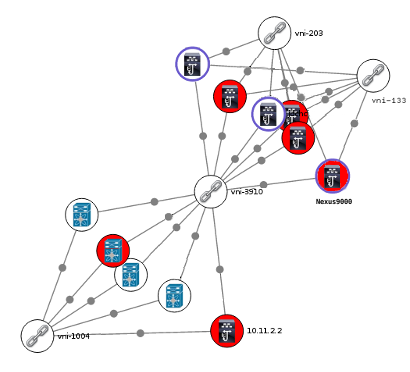
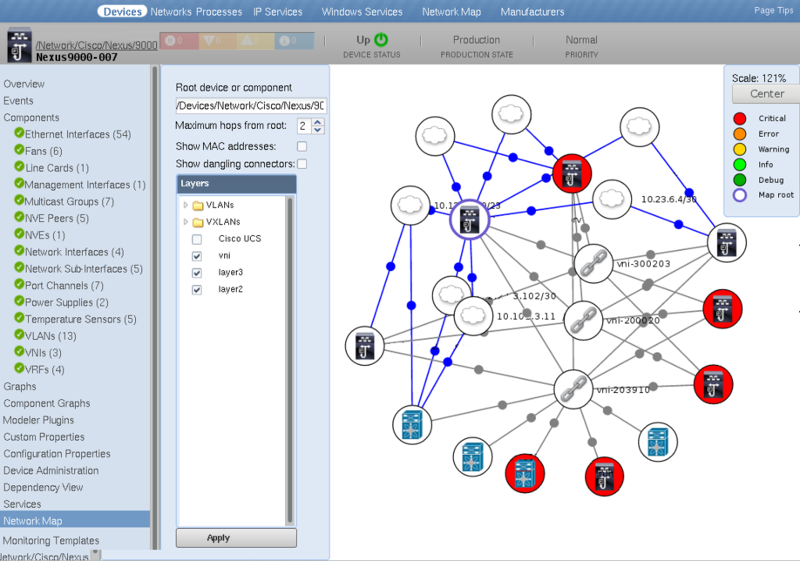
CiscoMonitor Network Map
Discovery
Chassis
Switch Stack Members
Fans
Fan Modules
Fibre Channel Interfaces and Modules
IO Cards
Line Cards
Network Modules
Module Fans
Other Logical Interfaces
Physical Ports, Interfaces, Virtual Interfaces and Sub-Interfaces
Port Channels and Bundles
Power Supplies
QoS Class Maps
RTT Probes
Supervisor Modules
Temperature Sensors
VLANs
VRFs
Monitoring
Event collection from
syslogand SNMP trapsCPU and memory utilization for chassis and supervisor modules
Memory buffer pool monitoring (optional)
Power consumption and status for chassis and FRUs
Power available and drawn for power supplies
Rotates per minute and status for Module Fans
Status for Fan Modules
Status for IO Cards
Temperature for temperature sensors
Interface utilization, throughput, error rate and status for all physical Ethernet interfaces
Interface utilization, throughput and status for all logical Ethernet interfaces
Throughput and status for VLANs
Additional Features
Discovery and monitoring are additionally supported for the following specific product lines:
Catalyst 6500 Features
Virtual Switching System (VSS)
Service Modules
Catalyst 9300 Features
Switch Stack Members
Network Modules
ACE Features
Virtual Contexts
Service Policies
Server Farms
Real Servers
FWSM Features
Security Contexts
L4/L7 Resources
Firepower FXOS Features
Chassis
Ethernet Interfaces
Fan Modules
Fans
IO Cards
Management Interfaces
Port Channels
Supervisor Modules
VLANs
VSANs
Virtual Ethernet Interfaces
Firepower FTD Features
Ethernet Interfaces
Resources
VLANs
Nexus 9000 Features
Fabric Cards
Virtual Device Contexts (VDCs)
VXLAN Network Identifiers (VNIs)
Network Virtualization Endpoints (NVEs)
NVE Peers
Multicast Groups
Nexus 7000 Features
Fabric Cards
Fabric Extenders
Network Virtualization Endpoints (NVEs)
Virtual Device Contexts (VDCs)
Nexus 6000 Features
Fabric Extenders
Virtual Device Contexts (VDCs)
Fibre-Channel Ports
VSANs
Storage Zones
Storage Zone Sets
Nexus 5000 Features
Nexus 2000 Fabric Extenders
Fibre-Channel Ports
VSANs
Storage Zones
Storage Zone Sets
Nexus 1010 Features
Virtual Services Blades
Nexus 1000V Features
Virtual Ethernet Modules (VEMs)
Virtual Ethernet Interfaces
VSG Features
Virtual Machine Zones
Virtual Security Gateway Features
Security Zones
ASR 9000 and 1000 Features
MPLS L3 VPNs
CSR 1000V Features
Similar to ASR 1000 without hardware components.
ASA 5500 Features
Security Contexts
IPSEC tunnels
IKE Tunnels
AnyConnect Sessions
NOTE: After the ZenPack upgrade completes, restart the 'zproxy' service to see new fields for 'AnyConnect Session' components in the user interface.
ASA 1000V Features
Similar to ASA 5500 without hardware components.
MDS 9000 Features
Fibre-Channel Ports
VSANs
Storage Zones
Storage Zone Sets
Wireless LAN Controller Features
Access Points
TelePresence Codecs
TelePresence peripherals
Class-Based QoS Monitoring
Virtana will model QoS class maps associated with network interfaces using the SNMP MIB:
CISCO-CLASS-BASED-QOS-MIB.
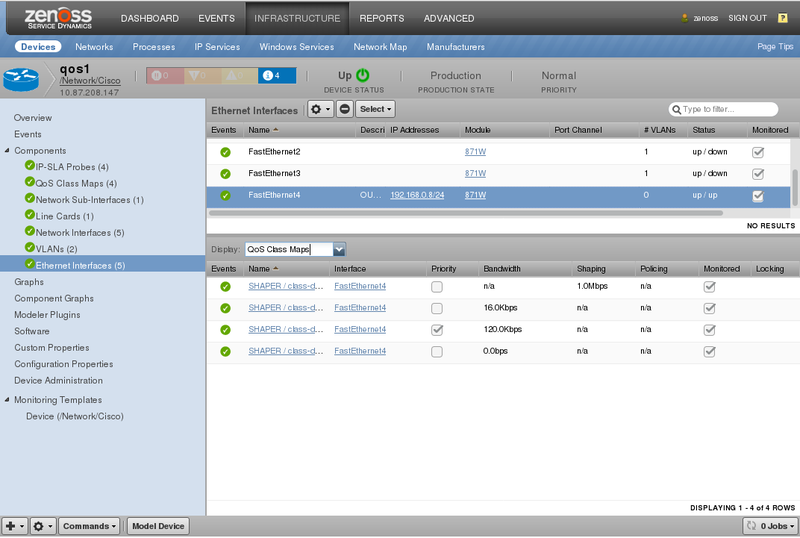
You can find all modeled class maps for a device by clicking QoS Class Maps under Components in the device's left navigation pane.
Interface Class Maps
Notes
Because the QoS components require the associated interfaces to be modeled using the cisco.snmp.Interfaces modeler, you might need to initially model your device twice for the QoS components to model. If QoS Class Maps components are not shown, then no class maps were modeled.
If you believe service policies have been configured and Virtana should have found them, verify that the cisco.snmp.QoSClassMaps modeler plugin is enabled, you have interface components, and then remodel the device.
To see just the class maps associated with a specific interface you can find the interface in question then choose QoS Class Maps in the Display drop-down instead of Graphs.
Beginning with version 5.11.0, the cisco.snmp.QoSClassMaps modeler plugin is disabled by default. For existing devices that have their own modeler plugin list, this component remains enabled if it was in this list. Otherwise, it is disabled.
QoS Class Maps
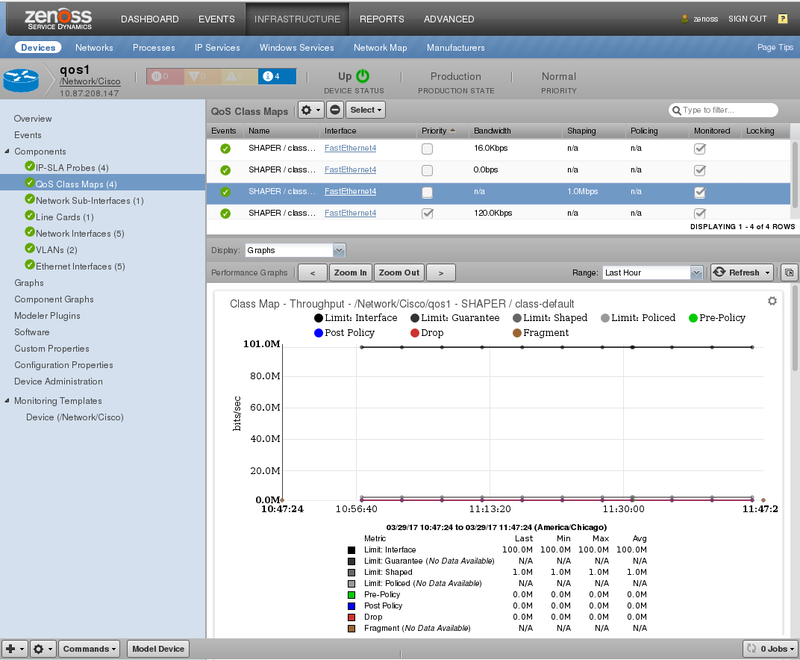
The following datapoints are monitored for all class maps:
Pre-Policy Throughput in bits/sec. (cbQosCMPrePolicyByte)
Pre-Policy Packet Rate in packets/sec. (cbQosCMPrePolicyPkt)
Post-Policy Throughput in bits/sec. (cbQosCMPostPolicyByte)
Drops in bits/sec. (cbQosCMDropByte)
Drops in packets/sec. (cbQosCMDropPkt)
Drops (no buffer) in packets/sec. (cbQosCMNoBufDropPkt)
Fragments in bits/sec. (cbQosCMFragmentByte)
Fragments in packets/sec. (cbQosCMFragmentPkt)
The following datapoints are monitored for class maps with queueing configurations:
Queue Depth (Current) in bytes. (cbQosQueueingCurrentQDepth)
Queue Depth (Maximum) in bytes. (cbQosQueueingMaxQDepth)
Queue Discards in bits/sec. (cbQosQueueingDiscardByte)
Queue Discards in packets/sec. (cbQosQueueingDiscardPkt)
The following datapoints are monitored for class maps with traffic shaping configurations.
Shaping Queue Depth in packets. (cbQosTSStatsCurrentQSize)
Delayed by Shaping in bits/sec. (cbQosTSStatsDelayedByte)
Delayed by Shaping in packets/sec. (cbQosTSStatsDelayedPkt)
Dropped by Shaping in bits/sec. (cbQosTSStatsDropByte)
Dropped by Shaping in packets/sec. (cbQosTSStatsDropPkt)
The following datapoints are monitored for class maps with policing configurations.
Policing Conformed in bits/sec. (cbQosPoliceConformedByte)
Policing Conformed in packets/sec. (cbQosPoliceConformedPkt)
Policing Exceeded in bits/sec. (cbQosPoliceExceededByte)
Policing Exceeded in packets/sec. (cbQosPoliceExceededPkt)
Policing Violated in bits/sec. (cbQosPoliceViolatedByte)
Policing Violated in packets/sec. (cbQosPoliceViolatedPkt)
The 64bit versions of all of the above counters will be used if Virtana monitors the device with SNMPv2c or greater, and if the device supports them. Otherwise, the 32bit versions of the counters will be used.
Choosing the Proper Device Class
To ensure that the most appropriate discovery and monitoring is being performed for a device it must be placed into the appropriate device class. The following table maps the type of Cisco device to the device class to which it should be assigned.
NOTE: It is not always necessary to manually assign devices to device classes. When adding devices using the Add Multiple Devices wizard, you will have a reduced set of choices that are intuitive based on the type of device.
Cisco Device Type | Device Class |
|---|---|
ACE | /Network/Cisco/ACE |
ASA | /Network/Cisco/ASA |
ASA-SM | /Network/Cisco/ASA |
ASR 1000 | /Network/Cisco/ASR/1000 |
ASR 9000 | /Network/Cisco/ASR/9000 |
CatOS (Other) | /Network/Cisco/CatOS |
Catalyst 6500 | /Network/Cisco/6500 |
Catalyst 6500 VSS | /Network/Cisco/6500/VSS |
Catalyst 9300 | /Network/Cisco/9300 |
Firepower FXOS | /Network/Cisco/Firepower/FXOS |
Firepower FTD | /Network/Cisco/Firepower/FTD |
FWSM | /Network/Cisco/FWSM |
IOS (Other) | /Network/Cisco |
MDS 9000 | /Network/Cisco/MDS/9000 |
Nexus 1000V | /Network/Cisco/Nexus/1000V |
Nexus 1010 | /Network/Cisco/Nexus/1010 |
Nexus 3000 | /Network/Cisco/Nexus/3000 |
Nexus 5000 + 2000 | /Network/Cisco/Nexus/5000 |
Nexus 6000 | /Network/Cisco/Nexus/6000 |
Nexus 7000 | /Network/Cisco/Nexus/7000 |
Nexus 9000 | /Network/Cisco/Nexus/9000 |
TelePresence Codec | /Network/Cisco/Codec |
VSG | /Network/Cisco/VSG |
WLC | /Network/Cisco/WLC |
Catalyst 9800 | /Network/Cisco/WLC/C9800 |
Configuring Credentials
Virtana uses different network protocols to monitor different types of Cisco devices. In many cases Virtana will use multiple protocols for the same device. The following table describes the supported device types and the protocol(s) that are used to discover and monitor them:
Cisco Device Type | Discovery and Monitoring Protocol(s) |
|---|---|
ACE | ICMP, SNMP, API (XML over HTTPS: 443/tcp) |
ASA | ICMP, SNMP |
ASA-SM | ICMP, SNMP |
ASR 1000 | ICMP, SNMP |
ASR 9000 | ICMP, SNMP, Telnet or SSH |
CatOS (Other) | ICMP, SNMP |
Catalyst 6500 | ICMP, SNMP, Telnet or SSH |
Catalyst 6500 VSS | ICMP, SNMP, Telnet or SSH |
Catalyst 9300 | ICMP, SNMP |
Firepower FXOS | ICMP, SNMP |
Firepower FTD | ICMP, SNMP |
FWSM | ICMP, SNMP |
IOS (Other) | ICMP, SNMP |
MDS 9000 | ICMP, SNMP |
Nexus 1000V | ICMP, SNMP, Netconf (XML over SSH) |
Nexus 1010 | ICMP, SNMP, Netconf (XML over SSH) |
Nexus 3000 | ICMP, SNMP, Netconf (XML over SSH) |
Nexus 5000 + 2000 | ICMP, SNMP, Netconf (XML over SSH) |
Nexus 6000 | ICMP, SNMP, Netconf (XML over SSH) |
Nexus 7000 | ICMP, SNMP, Netconf (XML over SSH) |
Nexus 9000 | ICMP, NX-API (XML over HTTP) |
TelePresence Codec | ICMP, SNMP |
VSG | ICMP, SNMP, SSH, Netconf (XML over SSH) |
WLC | ICMP, SNMP |
Catalyst 9800 | ICMP, SNMP |
The following configuration properties should be set to provide the necessary credentials for the management protocols listed above:
Protocol | Configuration Properties | Notes |
|---|---|---|
SNMPv1 and SNMPv2c | zSnmpCommunities, zSnmpCommunity | SNMPv1 will only be used if SNMPv2c tests fail. |
SNMPv3 | zSnmpSecurityName, zSnmpAuthType, zSnmpAuthPassword, zSnmpPrivType, zSnmpPrivPassword | SNMPv3 must be specified using zSnmpVer. |
Telnet, SSH, Netconf | zCommandProtocol, zCommandPort, zCommandUsername, zCommandPassword | Protocol and port control whether SSH or telnet will be used. |
ACE XML over HTTP API | zCommandUsername, zCommandPassword, zCiscoACEUseSSL | |
NX-API over HTTP API | zCommandUsername, zCommandPassword, zCiscoNXAPIUseSSL, zCiscoNXAPIPort |
zProperties for CiscoMonitor
Relevant CiscoMonitor zProperties, their descriptions, and defaults are presented.
Empty defaults indicate an empty string or list, appropriate to its type.
Default value with an astrisk (*), indicate that the default is inherited from the globally defined value. See the Device configuration properties section of the Virtana Administration Guide for more information about these properties.
zProperty | Description | Default |
|---|---|---|
zCommandUsername | Username used for various APIs | * |
zCommandPassword | Password used for various APIs | * |
zCommandPort | Port used for various APIs | 23 (ASR and CSR only) |
zCiscoACEUseSSL | Use SSL for ACE communication | true |
zCiscoNXAPIPort | NX-API port setting | 443 |
zCiscoNXAPIUseSS | Use SSL for NX-API communication | true |
zCiscoNXAPIInterval | Seconds between NX-API collections | 300 |
zCiscoRemodelEventClassKeys | Keys which trigger source device remodels | |
zEntSensorStatusIgnoreValues | Don't model environment sensors with these statuses. | ['unavailable'] |
zIdiomUsername | Username for the IDIOM API | |
zIdiomPassword | Password for the IDIOM API | |
zIncludeDescriptionInTempSensorId | Include description in temp sensor ID. Applicable only for entSensorValueEntry OID. Note: if set to true, historical data for existing temperature sensors will be lost. | false |
zInterfaceMapIgnoreNames | Interface names not to model | * |
zInterfaceMapIgnoreTypes | Interface types not to model | * |
zInterfaceMapIgnoreDescriptions | Don't model interfaces with these descriptions. | * |
Firewall Access
The firewall access to and from the Virtana collector server to the monitored devices can depend on the type of device being monitored. The following table provides a consolidated view of all required network access.
Source | Destination | Port & Protocol |
|---|---|---|
Virtana Collector | Monitored Device | ICMP (ping) |
Virtana Collector | Monitored Device | 161/udp (SNMP) |
Virtana Collector | Monitored Device | 22/tcp (SSH) |
Virtana Collector | Monitored Device | 23/tcp (telnet) |
Virtana Collector | Monitored Device | 443/tcp (HTTPS) |
Virtana Collector | Monitored Device | 80/tcp (HTTP) |
Monitored Device | Virtana Collector | ICMP (ping) |
Monitored Device | Virtana Collector | 162/udp (SNMP trap) |
Monitored Device | Virtana Collector | 514/udp (syslog) |
Monitoring Logical Contexts
Several supported device types have the ability to create logical contexts of various kinds. In these cases, Virtana has the ability to identify the logical contexts and associate them with the admin or parent context. The following list of device types that support logical contexts and how Virtana refers to them.
ACE: Virtual Contexts
FWSM: Security Contexts
ASA: Security Contexts, IPSec Tunnels, IKETunnels
Nexus 9000: VDCs
Nexus 7000: VDCs
Nexus 6000: VDCs
For Virtana to be able to discover and associate these types of logical contexts with the admin or parent context, the management IP address of each logical context must itself be discovered as a separate device in Virtana. The logical contexts should be placed into the same device class as the device they're a context of. For example, a Nexus 7000 VDC should be placed in the /Network/Cisco/Nexus/7000 device class.
Controlling Automatic Remodeling
Certain SNMP traps will cause Virtana to schedule an immediate remodeling of the device from which the trap was sent. The traps that will cause this automatic remodeling by default are:
ccmCLIRunningConfigChanged
cefcFRUInserted
cefcFRURemoved
cefcModuleOperStatus
cefcModuleStatusChange
ceSensorExtThresholdNotification
cesRealServerStateChangeRev1
ciscoSlbExtMIBConform
ciscoSlbVServerStateChange
entConfigChange
vtpVlanCreated
vtpVlanDeleted
This list can be modified by using changing the zCiscoRemodelEventClassKeys configuration property.
Monitoring Memory Buffer Pools
Monitoring detailed memory buffer pool statistics are not enabled by default. When enabled, the following statistics can be monitored on any Cisco devices that support OLD-CISCO-MEMORY-MIB.
Memory Buffers
Allocation of Max
Usage of Total
Failures
Hits
Misses
Creates
Trims
Buffer elements and small, medium, big, large and huge buffer pools are included for each of these categories.
To enable memory buffer pool monitoring you must bind the Memory Buffer Pools monitoring template to the desired device class or device. You will then find the associated graphs on the Graphs screen for each device to which the monitoring template has been bound.
Monitoring CPUs
While extensive CPU monitoring is done by default for most Cisco devices and applicable modules on those devices, it can sometimes be desirable to monitor CPUs directly using CISCO-PROCESS-MIB. If Virtana isn't already capturing CPU information you know exists in CISCO-PROCESS-MIB, you can enable further support by enabling the cisco.snmp.CPUs modeler plugin.
Devices with multiple CPUs will be monitored via Cisco SNMP datasource, which uses the zenpython service to collect SNMP metrics for each CPU and calculates the average utilization basing on the collected values.
NOTE : For Cisco ASA Devices (/Network/Cisco/ASA device class), if device doesn't support modern CPU metrics (e.g. cpmCPUTotal5minRev: 1.3.6.1.4.1.9.9.109.1.1.1.1 OID), Device-Legacy monitoring template will be used instead of Device-Modern one.
Monitoring Memory Pools
If you want Virtana to model and monitor all memory pools on your Cisco device using the CISCO-MEMORY-POOL-MIB, enable the cisco.snmp.MemoryPools modeler plugin.
Monitoring IPsec Tunnels for ASA devices
This ZenPack provides a feature to detect and alert you when one or multiple dropped IPsec tunnels are in an ASA device. In this case, you receive the warning event with a list of dropped IPsec tunnels and notifications to remodel the target device. After device is remodeled, the event is cleared.
NOTE: To control the severity, event class, and cycle time of the event creation, you can change the corresponding fields under the tunnelDroppedAlert data source for IPSec Tunnels components.
Limitations
The following potential limitations should be noted.
This ZenPack does not provide support for UCS. Instead, UCS is supported in ZenPacks.zenoss.CiscoUCS.
This ZenPack does not provide support for Cisco CallManager. Instead, Cisco CallManager is supported in ZenPacks.zenoss.CallManagerMonitor.
In Zenoss 5.x, graph points from same graph cannot be used in calculations for other points. (ZEN-18541)
In Zenoss 5.x, Custom graph point with Type COMMENT is not supported. (ZEN-18540)
Line cards Operational Status and UpTime are not monitored for Catalyst 9000 Series Switches which are coupled using StackWise technology.
Performance Optimizations for Event Transformations
In case you experience a lot of the event transformations, caused by SNMP traps or other activity from your Cisco devices, the speed of event processing might be affected. There are several things which you can do to mitigate the effect:
You can switch zeneventd service to debug mode and check its logs for slow transformations and disable those which aren't critical. To disable a transformation but leave the original mapping untouched, you can create a copy of the original mapping with empty Transform box and lower sequence number under /Status event class, Event Class Key field must correspond to the original.
Check
Controlling Automatic Remodelingsection in the documentation and modify zCiscoRemodelEventClassKeys zProperty for a device or device class to reduce the amount of automatic device remodeling during the event transformations.
Monitoring Memory Utilization on Cisco ASR 9000
If the amount of RAM installed on your Cisco ASR 9000 device is less than 4GB, the Memory Utilization graph and all the related datasources will be available on the device's level, and can be modified under DeviceMemoryUsage32Bit monitoring template. Otherwise, the Memory Utilization graph and all the related datasources will be shown on Supervisor Modules component level and available for modifications under SupModuleExtended monitoring template.
Ethernet Interfaces
In CiscoMonitor we provide a custom component type called Ethernet Interfaces which shows a type of ethernetCsmacd_64 but binds the EthernetInterface template which is not matching the standard behavior described in the Virtana documentation.
Dynamic View and Service Impact
CiscoMonitor supports a wide variety of devices and therefore a variety of DynamicView/Impact (DVI) relationships exist.
NOTE: An interface can be attached to a module, or a directly to a device.
The following diagrams summarize Impact/DynamicView support:
Nexus Devices
The following covers Nexus devices in general, including Nexus 7000 and Nexus 9000 switches.
DVI Relations for Nexus Series
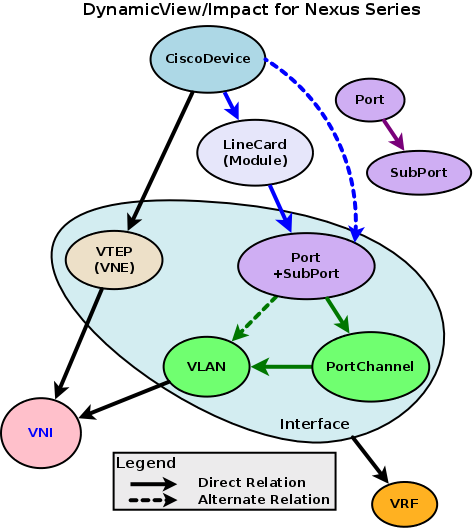
NOTE: Port refers to all network interfaces except PortChannel and VLAN.
Device impacts VTEP/NVE and LineCard modules
Device impacts Port (if no module)
VTEP/NVE impacts VNI
LineCard impacts network Port
Port impacts PortChannel or VLAN
PortChannel impacts VLAN
VLAN impacts VNI
Interface (all types) impacts its containing VRF
Port impacts its child SubPort
The following diagram outlines extra DVI relationships. The first two are repeated from above for clarity:
Extra DVI Relations for Nexus
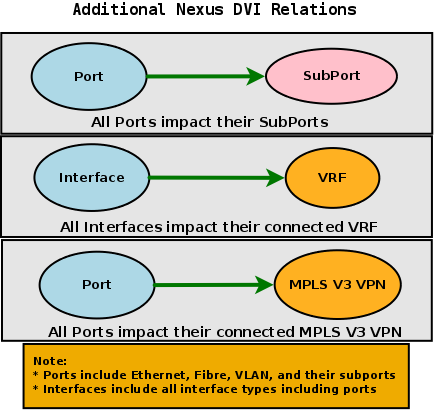
Port impacts SubPort
Interface (all types) impacts its containing VRF
Port impacts its containing MPLS V3 VPN
Multicast Groups
Multicast Groups have impact relations between VRFs and VNIs. These relations augment the generic Nexus relations above. Note the usual Device-Module-Interface relations:
DVI Relations for Multicast Group, VRF, VNI
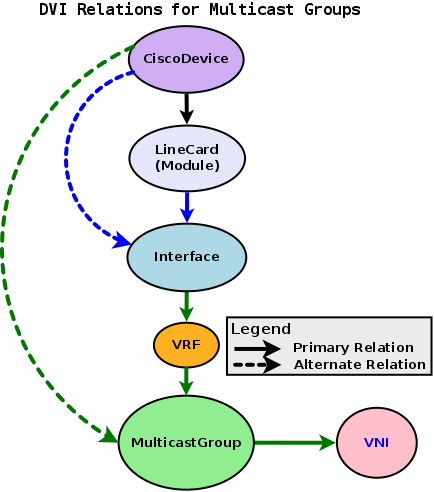
Device impacts MulticastGroup (if not part of a VRF)
Interface impacts VRF
VRF impacts MulticastGroup
MulticastGroup impacts VNI
Nexus 1000V and 1010 Devices
The following is specific to Nexus 1000V and 1010:
DVI Relations for Nexus1000V and Nexus1010
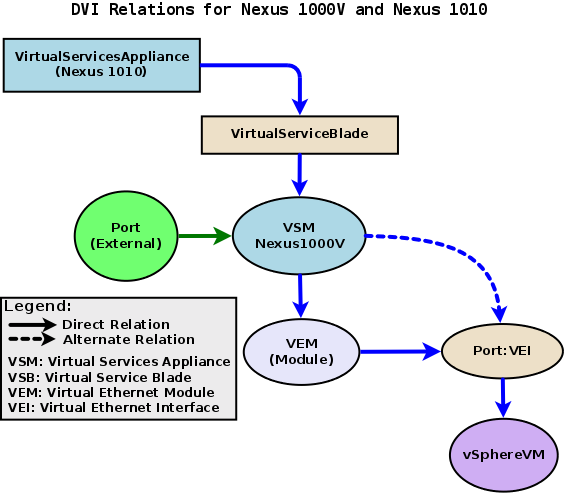
VirtualServiceAppliance (AKA: Nexus 1010) impacts VirtualSericeBlade
VirtualSericeBlade impacts VSM (aka: Nexus 1000V or VirtualServiceModule)
External Port impacts VSM
VSM impacts VEM (VirtualEthernetModule)
VSM impacts VEI (VirtualEthernetInterface)
VEI impacts assigned vSphere VMs
VSG and VMZone
The following is specific to Virtual Security Group (VSG) and VMZone. Portions of the Nexus 1010 and VirtualServiceBlade are similar to above:
DVI Relations for VSG and VMZone
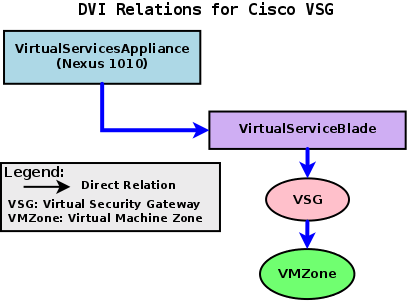
VirtualServiceAppliance (aka: VSA) impacts VirtualSericeBlade
VirtualSericeBlade impacts VSG
VSG impacts VMZone
Application Control Engine (ACE)
The following is specific to ACE. Note that ACE hardware components are also identified as ACE Contexts:
DVI Relations for ACE
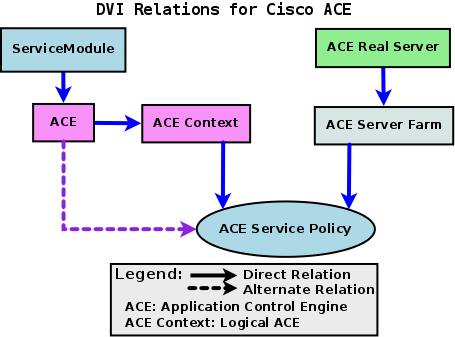
ServiceModule impacts ACE
ACE impacts ACE Context
ACE impacts ACE Service Policy
ACE Real Server impacts ACE Server Farm
ACE Server Farm impacts ACE Service Policy
Multilayer Director Switch: MDS 9000 Series
The following is specific to MDS 9000, FibreChannel, VSAN, Zone and ZoneSet:
DVI Relations for MDS 9000
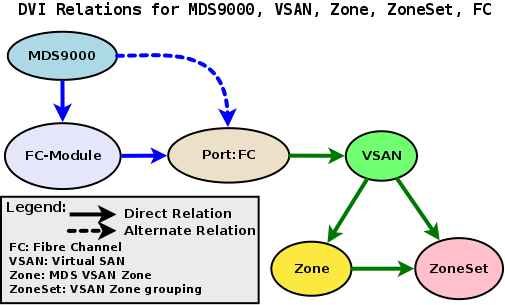
MDS9000 impacts FC-Module
MDS9000 impacts FC port (if no module)
FC port impacts VSAN
VSAN impacts Zone
VSAN impacts ZoneSet
Zone impacts ZoneSet
ASA and FWSM
The ASA (Adaptive Security Appliance) and FWSM (Firewall Services Module) are covered here. Their architecture is nearly identical:
DVI Relations for ASA and FWSM
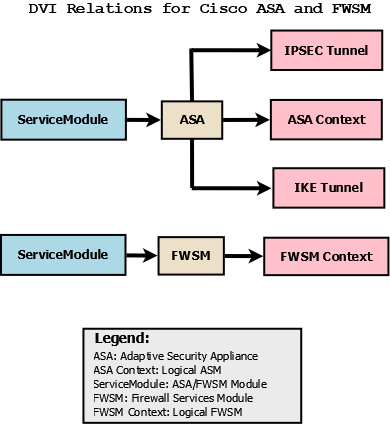
Module impacts ASA/FWSM
ASA/FWSM impacts Context
QoS Class Maps
QoS Class Maps affect their interface:
DVI Relations QoS Class Map
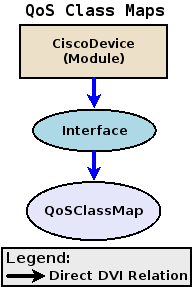
Device (or module) impacts Interface
Interface impacts QoSClassMap
Fans, Power Supplies, and Temperature Sensors
All Fans, Power Supplies, Fan Modules and Temperature Sensors affect device directly:
DVI Relations for Fans, Power Supplies, and Temperature Sensors
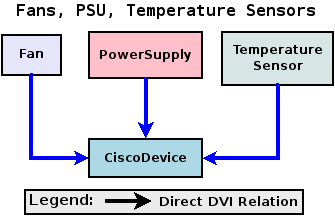
Fan impacts Device
PowerSupply impacts Device
TemperatureSensor impacts Device
Firepower FXOS
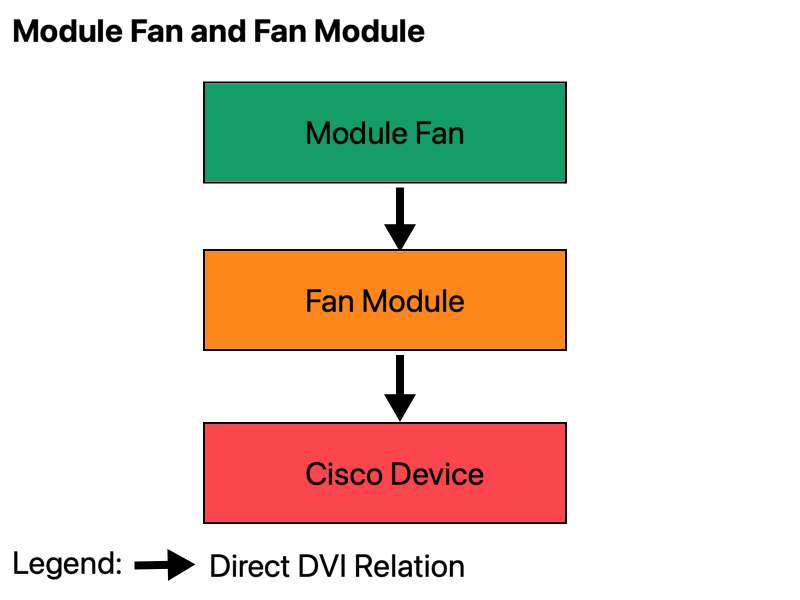
Fan Modules impacts Device
Module Fans impacts Fan Modules
DynamicView Views
**DVI VLAN View
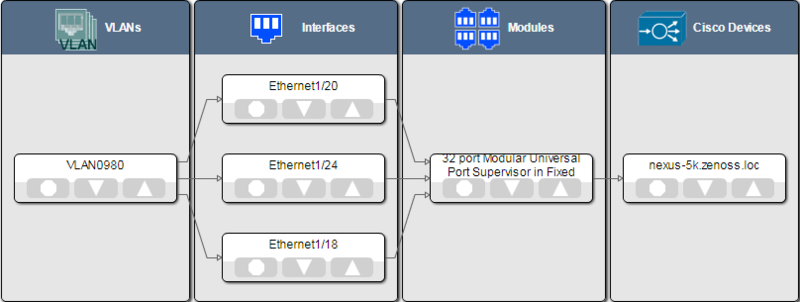
DynamicView displays are available for the following components:
Interface
Module
MulticastGroup
NVE
PortChannel
VLAN
VNI
VRF
NOTE: There are no DynamicView views for QoS Class Maps, Fans, Temperature Sensors, Power Supplies and Fan Modules components.
NOTE: Ensure you are using DynamicView 1.6.1 or newer, otherwise you may see this error in a DynamicView view:
[Error with zenjserver, please check log for errors.]
Network Icons
The following network icons are used in Impact and DynamicView diagrams in the UI:
AnyConnectSession |  |
Fan |  |
FanModule |  |
IKETunnel |  |
Interface |
|
IPSecTunnel |  |
Module |
|
MulticastGroup |
|
NVE |
|
PortChannel |
|
VLAN |
|
VNI |
|
VRF |
|
Zone |
|
ZoneSet |
|


Appendix A: Included MIBs
This ZenPack installs the following MIBs. Any SNMP traps defined in these MIBs will be decoded by Virtana.
BRIDGE-MIB
CISCO-CONFIG-MAN-MIB
CISCO-ENHANCED-SLB-MIB
CISCO-ENTITY-FRU-CONTROL-MIB
CISCO-ENTITY-SENSOR-EXT-MIB
CISCO-ENTITY-SENSOR-MIB
CISCO-ENVMON-MIB
CISCO-FC-FE-MIB
CISCO-FLEX-LINKS-MIB
CISCO-HSRP-MIB
CISCO-IF-EXTENSION-MIB
CISCO-L2-TUNNEL-CONFIG-MIB
CISCO-LINK-ERROR-MONITOR-MIB
CISCO-MAC-NOTIFICATION-MIB
CISCO-MODULE-AUTO-SHUTDOWN-MIB
CISCO-NS-MIB
CISCO-OSPF-MIB
CISCO-OSPF-TRAP-MIB
CISCO-RTTMON-MIB
CISCO-SLB-EXT-MIB
CISCO-SLB-HEALTH-MON-MIB
CISCO-SLB-MIB
CISCO-SMI
CISCO-ST-TC
CISCO-STP-EXTENSIONS-MIB
CISCO-TC
CISCO-VLAN-MEMBERSHIP-MIB
CISCO-VSAN-MIB
CISCO-VTP-MIB
CISCO-ZS-MIB
CISCO-STACKWISE-MIB
ENTITY-MIB
ENTITY-SENSOR-MIB
HC-ALARM-MIB
IF-MIB
OLD-CISCO-INTERFACES-MIB
OLD-CISCO-SYSTEM-MIB
OLD-CISCO-TCP-MIB
OLD-CISCO-TS-MIB
P-BRIDGE-MIB
Q-BRIDGE-MIB
RMON2-MIB
SNMPv2-MIB
TOKEN-RING-RMON-MIB
TOKEN-RING-RMON-MIB
SNMPv2-SMI
SNMPv2-TC
SNMP-FRAMEWORK-MIB
RFC1213-MIB
INET-ADDRESS-MIB
Appendix B: IP-SLA (RTTMON) Monitoring
IP-SLA refers to Cisco IOS IP Service Level Agreement monitoring. This ZenPack provides limited IP-SLA support for IP-SLA Probes found in the component grid for devices that support the CISCO-RTTMON-MIB MIB. RTTMON refers to Round Trip Time Monitor.
Templates that use IP-SLA are all in the /Network/Cisco device class:
RTTProbeGeneric
RTTProbeICMPJitter
RTTProbeJitter
We discuss each of these templates in order.