Palo Alto Networks Integration Service
ZenPacks.zenoss.PS.PaloAlto
This ZenPack provides the ability to model and monitor the Palo Alto Panorama management systems (PAN-OS 8.0 and higher) and 3000, 5000, 7000 firewalls (PAN-OS 6.1 and higher).
Support
This ZenPack is developed and supported by Virtana. Enterprise support is available to Virtana customers with an active subscription or support agreement. ZenPacks are available at delivery.zenoss.com. To request more information about this or any other ZenPack, contact Virtana.
This ZenPack is developed and supported by Virtana Professional Services, and is a supplemental monitoring offering to the standard Virtana product subscription or support agreement. These are offered as separate subscriptions in order to provide initial setup, training, and ongoing compatibility and maintenance. All standard packages are renewable every 12 months from the date of purchase. Contact Virtana to request more information regarding this or any other ZenPacks.
Releases
Version 2.9.9. Released on 2025/04/16.
Prerequisites
Prerequisite | Restriction |
|---|---|
Product | Zenoss 6.0 or higher |
Required ZenPacks | ZenPacks.zenoss.PythonCollector >=1.10.0 |
| ZenPacks.zenoss.ZenPackLib >=2.1.1 |
| ZenPacks.zenoss.PS.Util >=1.12.2 |
Configuration
This ZenPack supports SNMP and the PAN-OS XML API for collecting modeling data and metrics for the Palo Alto devices.
SNMP polling is configurable with standard Virtana functionality.
XML API Configuration
The following zProperties configure the API connection:
-
zPaloAltoApi_token The API Token for authenticating to the API
-
zPaloAltoApi_port The TCP port used to connect to the API (default: 443)
-
zPaloAltoApi_use_https Whether to use HTTPS for connecting to the API (default: true)
-
zPaloAltoApi_request_timeout Timeout for requests while waiting for a response (default: 10 seconds)
-
zPaloAltoApi_concurrency The number of concurrent requests to allow to the device at the same time (default: 3)
Generating the API Token
PaloAlto devices support obtaining the API Token through a web browser with the following or similar URL (refer to latest Palo Alto documentation to verify the correctness of this url and its parameters):
https://FIREWALL-IP/api/?type=keygen&user=username&password=password
The response should contain the needed key like
<response status="success">
    <result>
        <key>0RgWc42Oi0vDx2WRUIUM6A</key>
    </result>
</response>
Customizing Utilization Threshold
By default the High Utilization Threshold for the Logical Interface uses the speed (here.speed) of the underlying hardware interface.
To customize this per Logical Interface component
Change display to "Templates"
Create a local copy
Edit "Maximum Value" of the High Utilization Threshold to an appropriate value
Modeler Plugins
Modeler plugins exist for both API and SNMP protocols. By default API based plugins are mostly preferred. These can be changed to match the desired behavior on a Device or DeviceClass level.
Note that not all Modeler plugins are enabled by default. Review the selected plugins to match your device configuration.
API Based Plugins
pan.http.ApiDevice
modeling from values via PAN-OS XML API with command
"<show><system><info></info></system></show>"
pan.http.ApiPanoramaIpInterface
modeling from values via PAN-OS XML API with command
"<show><interface>all</interface></show>"
Panorama specific
pan.http.ApiConnectedDeviceAndGroups
modeling from values via PAN-OS XML API with command
"<show><devices><connected></connected></devices></show>"
modeling from values via PAN-OS XML API with command
"<show><devicegroups></devicegroups></show>"
Panorama specific
pan.http.ApiBGPPeer
modeling from values via PAN-OS XML API with command
"<show><routing><protocol><bgp><peer></peer></bgp></protocol></routing></show>"
PA-series specific
pan.http.ApiPowerSupply
modeling from values via PAN-OS XML API with command
"<show><system><environmentals></environmentals></system></show>"
pan.http.ApiIpInterface
modeling from values via PAN-OS XML API with command
"<show><interface>all</interface></show>"
PA-series specific
pan.http.ApiPanoramaDiskPairAndDisk
modeling from values via PAN-OS XML API with command
"<show><system><raid><detail></detail></raid></system></show>"
Panorama specific
pan.http.ApiPanoramaFilesystem
modeling from values via PAN-OS XML API with command
"<show><system><disk-space></disk-space></system></show>"
Panorama specific
pan.http.ApiThermal
modeling from values via PAN-OS XML API with command
"<show><system><environmentals></environmentals></system></show>"
pan.http.ApiFan
modeling from values via PAN-OS XML API with command
"<show><system><environmentals></environmentals></system></show>"
pan.http.ApiPowerRail
modeling from values via PAN-OS XML API with command
"<show><system><environmentals></environmentals></system></show>"
SNMP Based Plugins
pan.snmp.PaloAltoDevice
pan.snmp.PaloInterfaceMap
pan.snmp.GlobalProtectGateway
PA-series specific
pan.snmp.Processor
pan.snmp.StorageArea
pan.snmp.TotalPower
pan.snmp.Session
pan.snmp.Vsys
PA-series specific
pan.snmp.card.Chassis
pan.snmp.card.PowerSupply
pan.snmp.card.FanSensor
pan.snmp.card.Disk
pan.snmp.card.Module
pan.snmp.card.FanTray
pan.snmp.card.TempSensor
pan.snmp.card.OtherSensor
pan.snmp.card.CpuCoreSensor
pan.snmp.Zone
requires PanOS 8
Before 2.6.0
Add a Panorama host as you would add any device, but specify /Network/PaloAlto/Panorama as the Device Class. To discover managed devices by Panorama device the XML API is used, so make sure needed zProperties mentioned in configuration section are set. Once configured, model the device. After modeling, managed firewall devices will be discovered and added as a separate devices under device class specified in zPaloAltoApi_device_class (/Network/PaloAlto/Firewall/PA-series by default). Also you can use zPaloAltoApi_production_state to set production state of discovered devices. After that configure discovered firewalls according to your environment.
In 2.6.0 and after
All Palo Alto devices should be added using the option Add Palo Alto device... add device button on the Infrastructure page. It allows you to add the Palo Alto device and specify needed SNMP or API configurations properties. Title and IP address are mandatory to add a device, while all other ones are optional. If optional properties are specified, they will override device class zProperties.
When upgrading to 2.6.0 from previous versions, a job for each Palo Alto device is triggered to change its id. This process might take some time because metrics related to each device should renamed. After the job is finished, a title of a device might be set to a new id; however, during the next modeling run, it will be set to a correct value. If the re-identifying device job fails, you must manually resume data collection for the device using the Resume Collection option in the Action menu at the bottom of the device overview page.
Device naming
Device id
Version 2.6.0:
As a device id, {model}_{serialNumber} (ex. PA-7000_010108001544) will be used
Notes:
After initial add device - ID would be set to temporary value (ex. PaloAltoDevice_e3ac2245fa13484d8329f950ab796227). But after modeling ID would be set to {model}_{serialNumber}.
If device ID would be changed manually - after modeling it would be overwritten to {model}_{serialNumber}
Starting 2.7.0:
Palo Alto device (Panorama and Firewall):
use value from
'Hostname or IP Address'field as a device ID (which was set in formAdd Palo Alto device...)
Auto-discovered device:
As a default device ID, {model}_{serialNumber} will be used
Note
If device ID would be changed manually - after modeling it would NOT be overwritten (no matter Palo Alto or auto-discovered device)
Device name
Starting 2.7.0:
Palo Alto device (Panorama and Firewall):
use value from
'Title'field as a device name/title (which was set in formAdd Palo Alto device...)
Connected device:
use
hostnameas a default device name/title (taken from the'hostname'field returned by the api)
Names for Palo Alto device and connected device could be changed in regular way - via device Overview tab > Device Name. Changing name for connected device triggers change name for related component.
Notes
Overwriting 'Tag' and 'Serial Number' values:
Tag and Serial Number values could be changed in regular way - via device
Overview tab > TagandOverview tab > Serial Numberaccordingly, but during modelling this values would be overwritten to modeled valuesTag and Serial Number values used for lookup device in catalog
Performance Reports
'CPU Utilization' and 'Memory Utilization' reports are available for devices modeled by PAN-OS XML API
API Based Monitoring Events
Monitoring Events are generated from the following Templates, which depend on these API Commands.
api_interface_readings
Monitors interface values from the PAN-OS XML API with command
"<show><interface>all</interface></show>"
Events generated from Thresholds
High Utilization
stateChange
Interface Drops
Interface Errors
ApiBGPPeer
BGP Peer monitoring via PAN-OS XML API with command
"<show><routing><protocol><bgp><peer></peer></bgp></protocol></routing></show>"
Raises event based on StatusThreshold with eventClassKey
PaloAltoApiBGPPeerAlarm(mapped to /Net/PaloAlto/Alarms).Note
bgp peer state values are different based on a firewall HA mode: for active firewall bgp peer values will be in range from 0 to 6; in case of a passive firewall values will be in range from 10 to 16.
PanoramaIpInterface
Monitors Panorama interface metrics from the PAN-OS XML API with command
"<show><interface>{{interface}}</interface></show>"
Events generated from Thresholds
Interface Drops
Interface Errors
Interface Collisions
stateChange
PanoramaFilesystem
Monitors Panorama FileSystem metrics from the PAN-OS XML API with command
"<show><system><disk-space></disk-space></system></show>"
Events generated from Thresholds
"90 percent used"
PanoramaDiskPair
Monitor Panorama Disk Pair via PAN-OS XML API with command
"<show><system><raid><detail></detail></raid></system></show>"
Raises event if Disk Pair Status is not 'clean' with eventClassKey
PaloAltoApiDiskPairAlarm(mapped to /Net/PaloAlto/Alarms)
PanoramaDisk
Monitor Panorama Disk Status via PAN-OS XML API with command
"<show><system><raid><detail></detail></raid></system></show>"
Raises event if Status is not 'present' with eventClassKey
PaloAltoApiDiskAlarm(mapped to /Net/PaloAlto/Alarms)
PanoramaDeviceGroup
Monitor Panorama Device Groups via PAN-OS XML API with command
"<show><devicegroups><name>{{deviceGroupName}}</name></devicegroups></show>"
Raises an event if the Device Group entries change with eventClassKey
PaloAltoApiDeviceGroupAlarm(mapped to /Net/PaloAlto/Alarms).
ApiFanTemplate
Monitor Fans via PAN-OS XML API with command
"<show><system><environmentals></environmentals></system></show>"
Events generated from StatusThreshold
"FanAlarm"
ApiThermalTemplate
Monitor Thermal Sensors via PAN-OS XML API with command
"<show><system><environmentals></environmentals></system></show>"
Events generated from Thresholds
"High temperature"
"ThermalAlarm"
ApiPowerSupplyTemplate
Monitor Power Supplies via PAN-OS XML API with command
"<show><system><environmentals></environmentals></system></show>"
Events generated from StatusThreshold
"PowerSupplyAlarm"
ApiPowerRailTemplate
Monitor Power Rails via PAN-OS XML API with command
"<show><system><environmentals></environmentals></system></show>"Events generated from Thresholds
"High usage"
"PowerRailAlarm"
OperationalMode
Monitor operational mode status via PAN-OS XML API with command
"<show><operational-mode></operational-mode></show>"
Raises an event if the state is not 'normal' with eventClassKey
PaloAltoApiOperationalMode
HighAvailabilityConnectionStatus
Monitor High Availability status via PAN-OS XML API with command
"<show><high-availability><state></state></high-availability></show>"
Events generated from thresholds when status changes
highAvailabilityConnectionStateChange
ApiSysUptime
Monitor Uptime via PAN-OS XML API with command
"<show><system><info></info></system></show>"
ApiSystemResources
Monitor cpu and memory info via PAN-OS XML API with command
"<show><system><resources></resources></system></show>
Note
in version 2.4.0 events related to the state of BGP Peers, Panorama Disks, Fans, Power Supplies, Thermals, Operational mode are based on the usage of StatusThreshold, so previous events which were generated by datasource plugins will be cleared during ZenPack upgrade, however, it is possible that after ZenPack has been installed and before Virtana Service Dynamics is restarted some events might be still generated by old code. In this case such events should be manually cleared.
Other Events
Miscellaneous events that can be generated by the Zenpack
Error | Trigger | Summary | Severity | EventClassKey | Possible messages |
|---|---|---|---|---|---|
Invalid Response | Raised based on incorrect credentials or any other reason that caused invalid response from PaloAlto | 1."Invalid credentials Please check API key (zPaloAltoApi_token)" 2."PaloAltoApi unable to process invalid response for device or component" | Error | PaloAltoApiAlarm | 1."Invalid credentials Please check API key (zPaloAltoApi_token)" 2."PaloAltoApi unable to process invalid response for device or component" |
Failed to collect data | Raised when data collection failed based on invalid response from PaloAlto | Based on Error Message | Error | PaloAltoApiAlarm | Based on Traceback |
No datapoint | Raised when no datapoint was found | 1."Interface state monitoring error" 2."State monitoring error" | Error | PaloAltoApiAlarm | 1."Unable to convert unknown state for component_name" 2."Unable to convert unknown state datapoint for device_name" |
Disk missing | Raised when a state of Disk has changed to missing | "State has changed to missing" | Error | PaloAltoApiDiskAlarm | "State has changed to missing" |
Unexpected DiskPair state | Raised when a state of Disk Pair is not in 'expectedStates' | "Disk_Pair_name alarm" | Warning | PaloAltoApiDiskPairAlarm | "Disk_Pair_name status is bad; expected states are ['expectedStates']" |
Unexpected DeviceGroup state | Raised when a state of current Device Group is different from a state collected Device Group | "Device_Group_name has changes" | Warning | PaloAltoApiDeviceGroupAlarm | "Changes are related to current_device + collected_device" |
Parsing Palo Alto uptime format into snmp | Raised while parsing Palo Alto uptime format into snmp | "No uptime or unknown format" | Error | PaloAltoApiSysUptimeAlarm | "No uptime or unknown format" |
High Availability monitoring | Raised when a state of HA datapoint is unknown | "HA connection status monitoring error" | Error | PaloAltoApiHAAlarm | "Unable to convert unknown state of datapoint for device" |
stateChange | Raised based on PaloAltoStatusThreshold when 'paloaltoapi_state' or 'apiShowInterfacestate' is down or n/a | 1."Change state: current status - down" 2."Change state: current status - n/a" | Critical Warning | PaloAltoApiAlarm | 1."Change state: current status - down" 2."Change state: current status - n/a" |
highAvailability ConnectionStateChange | Raised based on PaloAltoStatusThreshold when 'apiShowHA_connHA1', 'apiShowHA_connHA1Backup', or 'apiShowHA_connHA2' state is down | "High AvailabilityConnection State Change current status - down" | Warning | PaloAltoApiHAAlarm | "High AvailabilityConnection State Change current status - down" |
HaStateChange | Raised based on ValueChangeThreshold if a value is different than last time it was checked | "Value changed from <state> to <state>" Possible states are: active, passive, unknown, primary-active secondary-passive, n/a | Critical Warning Info | PaloAltoApiHAAlarm | "Value changed from <state> to <state>" |
Threshold of Status exceeded/not met current value | Raised based on MinMax Threshold if value exceeded or not met value | Processor Status is <state>. Possible states are: Unknown, Warning, Testing, Down. | Critical Warning | None | "Threshold of <status> exceeded/not met current value <value>" |
BGPPeerState | Raised when parsing BGPPeerState status | BGPPeerState current status: <status> | Info Warning | PaloAltoApi\ BGPPeerAlarm | BGPPeerState current status: <status> |
Modeler failed | Raised when modeler plugin failed | Modeler <name> failed with error code <error_code> | Warning | PaloAltoApiAlarm | Modeler <name> failed with error code <error_code> |
Failed to create device | Raised based on failure of creating panorama connected device | Panorama discovery: failed to create <name> device | Error | None | Found non Palo Alto device <name> with the same id of a collected connected device <name> skipping creation of connected device with duplicate id <id>. |
HA State not cached | Raised when a Status Threshold cannot determine the HA state of the device | Missing haState | Info | (as configured on threshold) | No haState for device <device> in Redis store |
Note
You will also receive a Clear event after related Error disappears
Status Threshold Severity Mapping by HA State
Starting in version 2.9.0, the PaloAltoStatusThreshold has a new field that allows for modifying the severity of the events generated by the threshold based on the haState of the device. By adding a mapping of haState value to suppression method, you can cause different suppression methods to apply based on different haState values. The current suppression methods are as follows:
standardFlow: no modification to event severity
suppressToInfo: event severity will be modified to Info
suppressCompletely: event will not be generated
If no mappings are defined or the haState of the device cannot be determined, standardFlow will apply.
Service Impact and Root Cause Analysis
When combined with the Virtana Service Dynamics product, this ZenPack adds built-in service impact and root cause analysis capabilities. The service impact relationships shown in the diagram and described below are automatically added and maintained. These will be included in any services that contain one or more of the discovered components listed above.
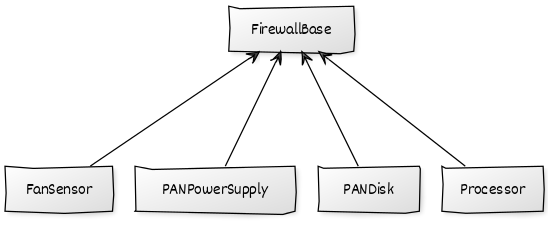
FirewallBase SNMP protocol based components:
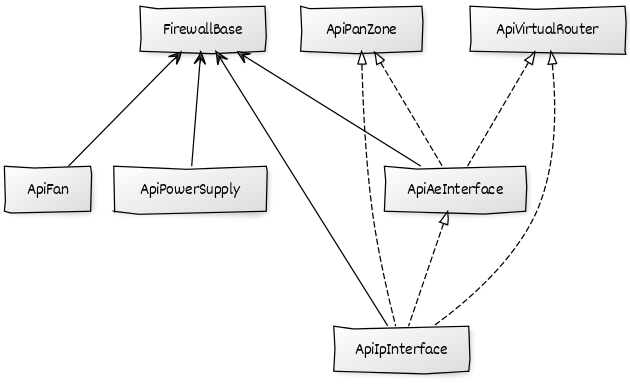
FirewallBase API protocol based components:
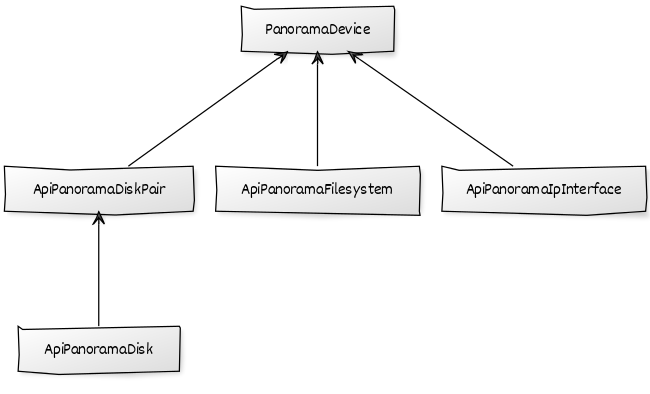
Panorama API protocol based components:
The following objects types would typically be added to Impact services:
FirewallBase
PanoramaDevice
Impact Relationships between Palo Alto Components
FirewallBase SNMP protocol based components
Processor impacts FirewallBase
PANDisk impacts FirewallBase
PANPowerSupply impacts FirewallBase
FanSensor impacts FirewallBase
FirewallBase API protocol based components
ApiFan impacts FirewallBase
ApiPowerSupply impacts FirewallBase
ApiIpInterface impacts FirewallBase
ApiAeInterface impacts FirewallBase
ApiIpInterface impacts ApiAeInterface
ApiIpInterface impacts ApiVirtualRouter
ApiAeInterface impacts ApiVirtualRouter
ApiIpInterface impacts ApiPanZone
ApiAeInterface impacts ApiPanZone
Panorama specific API protocol based components
ApiPanoramaDiskPair impacts PanoramaDevice
ApiPanoramaDisk impacts ApiPanoramaDiskPair
ApiPanoramaFilesystem impacts PanoramaDevice
ApiPanoramaIpInterface impacts PanoramaDevice
Changes
2.9.9
Fixes
SVC-3941 Update to coerce haStatus to a string before checking mapping in threshold
2.9.8
Fixes
SVC-3899 Fix Panorama device creation job task
2.9.7
Fixes
SVC-3889 Register zenjob task in configure.zcml
SVC-3695 Add third top processing option
2.9.6
Fixes
SVC-3654 Update to line breaks in command output
2.9.5
Fixes
SVC-3654 Update to support newer ’show support system resources’ command output
2.9.4
Fixes
SVC-3429 Update permissions behaviour for router
SVC-3437 Remove listTextArea registration
2.9.3
Fixes
SVC-3308 subinterface regex ae update
SVC-3312 process hw interface
SVC-3309 return initial logic for redisStore instantiation
2.9.2
Fixes
Require PS.Util 1.9.9 for RedisStore to avoid installation failure (SVC-3277)
2.9.1
Fixes
Do not create redis store until needed (SVC-3268)
handle multiline response in system resources (SVC-3256)
Allow datapoint values of zero (SVC-3256)
fix AttributeError for foundEntry (SVC-3256)
2.9.0 (Retracted due to SVC-3268)
Features
PAStatusThreshold suppression based on haState (SVC-2978, SVC-3084)
Add impact relationships (SVC-3085)
Creating clear events for sub-interfaces in case of incorrect state (SVC-3196)
Updated event for sub-interface state monitoring (SVC-3196)
2.8.0
Features
Add expanded documentation for possible events (SVC-2822)
Fixes
Fix Manufacturer Migrate Script Breaks Device HW Object (SVC-3001)
Fix Palo Alto not Reporting CPU and Memory utilization (SVC-2888)
Fix API Not Capturing All Interface Details (SVC-2865)
Fix Special Device Loader Does Not Create Audit Log Entry (SVC-3003)
Fix Power Rails Battery Model false Threshold event (SVC-2869)
Fix Events Classified as Unknown (SVC-2978)
Fix docbuilder not creating correct .pdf file (SVC-2822)
Fix PaloAlto Modeling missing HW and OS attributes (SVC-3059)
2.7.0
Features
Add separate event for unauthorized request (403 error) (SVC-2767)
Add a zFileSystemMapIgnoreNames property to exclude filesystems (SVC-2868)
Add separate component 'ApiAeInterface' for aggregated interfaces (SVC-2866)
Add Device(/) template to monitor sysUpTime (SVC-2307)
Add more detailed documentation (SVC-2842 - SVC-2844, SVC-2854)
Fixes
Fix Threshold name in ApiBGPPeer template, BPGPeerState should be BGPPeerState (SVC-2696)
Fix zenpack uninstall procedure (remove manufacturer info from objects.xml) (SVC-2690)
Update mapping for BGP status for a case of passive firewall (SVC-2575)
Fix default value for 'Use https' field in UI form (SVC-2801)
Fix Logical Interface template display - should be line in the graph (SVC-2867)
Fix device id and device title to be based on values from 'Add Palo Alto device' form (SVC-2821, SVC-2909)
2.6.0
Features
Add
zPanorama_connected_devices_ignore_namesproperty to filter out devices by hostname during discovery.Add
ApiDevicedevice modeler plugin to model serial and model numbers.Add custom device loader for Palo Alto devices.
Fixes
Fix device id to be based on model and serial number.
Update ip address of a firewall device if a collected ip address differs from existing one.
2.5.0
Features
Monitor Panorama Disk Pair status via Expected Status datasource.
Add Device RRD template by default for sysUpTime monitoring via SNMP.
Make unsupported command errors during modeling more specific.
Fixes
Add missing targetPythonClass to SNMP alarm_bits templates.
Fix Panorama filesystem parser to correctly consume extra spaces in response.
2.4.0
Features
Add zPaloAltoApi_device_class, zPaloAltoApi_production_state, zPanorama_create_devices to configure firewalls discovery.
Add new component 'Power Rail'.
Add HA info to device overview page.
Add StatusThreshold to be used for states/alarms monitoring.
Fixes
Fix 'Interface state monitoring error' by using parent's interface state if no state for specific interface is found.
Use '<show><system><environmentals>' for Power Supplies, Fans, Thermal modeling&monitoring.
Fix modeler plugins events to be more specific.
Fix RebuildRelationMigration to not fail when upgrading from 2.x and higher.
2.3.0
Features
Add zPaloAltoApi_concurrency to limit concurrent connections to a device.
Fixes
Remove 'number of active session' Threshold from the panVsys template. Used an invalid fixed maximum value and was redundant to the existing 'session utilization percent' Threshold.
2.2.2
Fixes
Resolves missing function from pan.snmp.StorageArea modeling plugin.
2.2.1
Fixes
Fix failed migration during ZenPack upgrade if devices are in /Network/PaloAlto or /Network/PaloAlto/Firewall classes.
Re-class devices in /Network/PaloAlto or /Network/PaloAlto/Firewall to a PaloAlto Device type.
2.2.0
Features
Add Zone Component and monitoring (new in PAN OS 8)
Fixes
Gracefully handle if no API Token configured - avoids tracebacks from zenpython
Fix alarm_bits datasource monitoring using String Status DataSource
2.1.0
Features
Split up pan.snmp.Card modeler plugin into modeler for each component:
pan.snmp.card.Chassis
pan.snmp.card.Disk
pan.snmp.card.FanTray
pan.snmp.card.Module
pan.snmp.card.PowerSupply
pan.snmp.card.CpuCoreSensor
pan.snmp.card.FanSensor
pan.snmp.card.OtherSensor
pan.snmp.card.TempSensor
added zPaloAltoApi_request_timeout to configure requests timeout to PAN-OS XML API
updated metrics collection for interfaces
Fixes
pan.snmp.Card modeler attempted to create some components with extra attributes, leading to Warning messages.
fixed errors related to interface monitoring
2.0.0
Features
Upgrade to using ZenPackLib 2.1.1
Add default transform for Processor Status Events, changed event class to /Status/PaloAlto/Processor
Add support of modeling and monitoring via XML API(default) for Thermal Sensor, Fan, Power Supply
Add new firewall components: Virtual Router, BGPPeer
New device type
Panorama Device - modeling and monitoring of Panorama management system
Fixes
Fix Status display in Processor Component Grid
Adjust Power High Usage Threshold to gracefully handle devices which do not report total_power_available
1.5.0
Features
New Component
Logical Interface Component - Additional Interface stats not captured by SNMP Interface component