Branding images
Branding images are the logo, favicon, and product-name image files that control the visual identity shown throughout the product. Administrators can replace these files to display a custom logo and favicon instead of the default Virtana branding
Prerequisites
You are logged in to Virtana IO as a user with the
Administratorrole.Your replacement image files use the same file names and file format as the existing images. Required dimensions vary by file, so use the existing images as your reference.
Your ZIP file should be less than 10 MB.
Your image files should be at the root of the ZIP file, not inside a subfolder.
You replace only the files that you want to change. Keep remaining as it is. Virtana IO ignores any extra files in the ZIP file apart from these 8.
Procedure
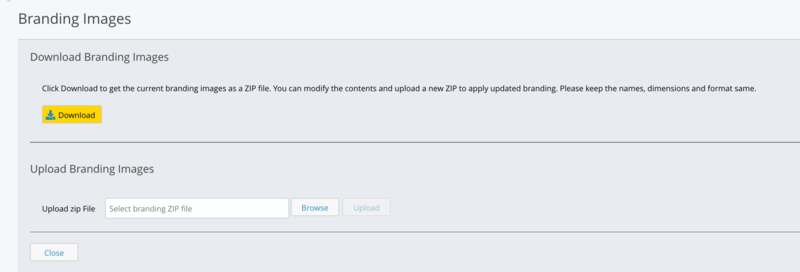
In the navigation pane, click the settings icon, and then click Branding Images.
Click .
Virtana IO downloads a ZIP file that contains the eight current branding images, including the logo and favicon files. A single image may have been used in more than one place in the interface.
Extract the ZIP file, and replace the images that you want to change.
Important
Keep the same file names, dimensions, and format as the original images. If a replacement image does not match, the upload might fail or the image might not display correctly.
Tip
Use a transparent background for image files that support it. This is optional, but it keeps a consistent look with the rest of the interface.
Compress the updated image files into a new ZIP file, with the files at the root of the ZIP file.
In the Upload zip File field, click , and select the new ZIP file.
Click .
Verification
Virtana IO confirms that the upload succeeded. Refresh the page to see the updated logo and favicon.
If your browser has the previous images cached, clear the browser cache to see the new versions. The updated branding applies for all users, not only the user who uploaded the files.
To restore the default branding, upload the original image files that you downloaded in the procedure. Custom branding images are preserved when you upgrade Virtana IO.
Troubleshooting
Issue | Cause | Resolution |
|---|---|---|
The upload fails, and Virtana IO displays a message on the page | A file is missing, incorrectly named, or in the wrong format | Correct the file name or format so that it matches the original file, and upload the ZIP file again |
The upload succeeds, but an image does not display correctly | The image has invalid dimensions | Resize the image to match the dimensions of the original file, and upload the ZIP file again |